
Quick Answer
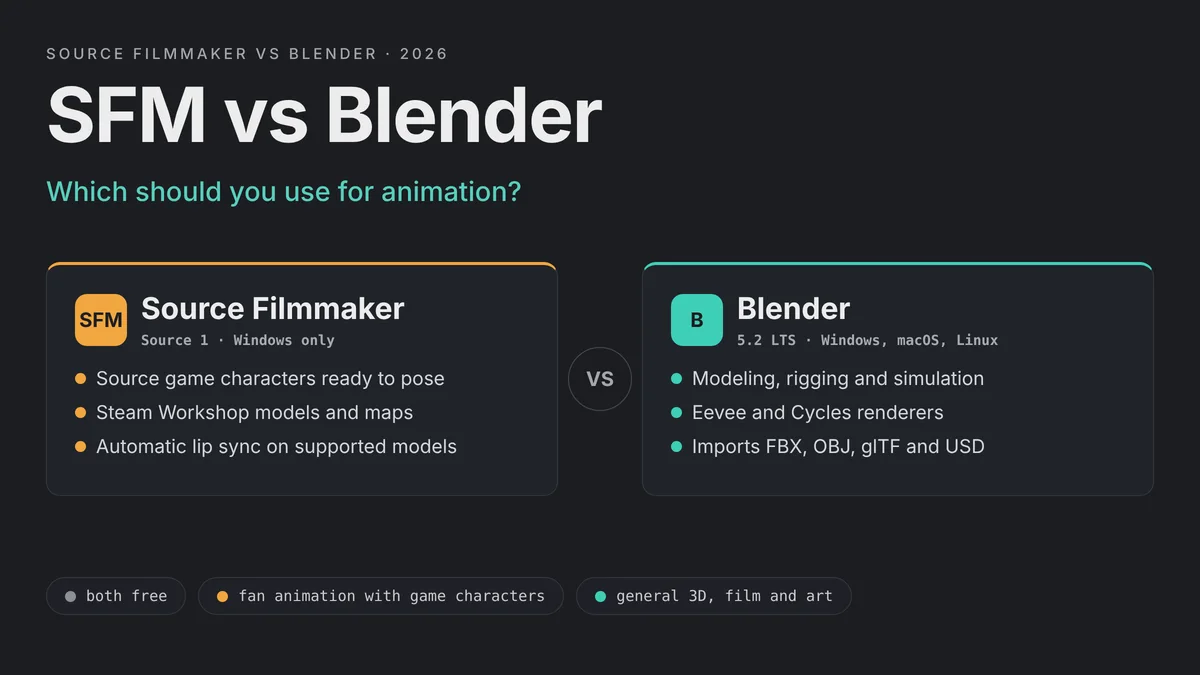
The SFM vs Blender choice comes down to what you want to animate. Source Filmmaker is the faster route to fan animations with Source game characters such as Team Fortress 2 mercenaries. Blender is the better long-term tool for general 3D work, because it models, rigs, simulates and renders almost anything. Both are free, and many animators use both.
Many animators end up using both. They build or fix models in Blender, then animate Source characters in SFM. This guide compares the two tools point by point, so you can pick the right one for your next project. If you choose SFM, our SFM compile guide shows how to bring your own models into it.
Define the project
Game-character fan animation points to SFM. Original characters, products or scenes point to Blender.
Check your computer
SFM needs Windows. Blender runs on Windows, macOS and Linux.
Check your assets
Source models and Workshop items load straight into SFM. FBX, OBJ, glTF and USD files suit Blender.
Plan for growth
Learn SFM for quick results, and Blender for skills that carry over to other 3D jobs.
SFM vs Blender at a Glance
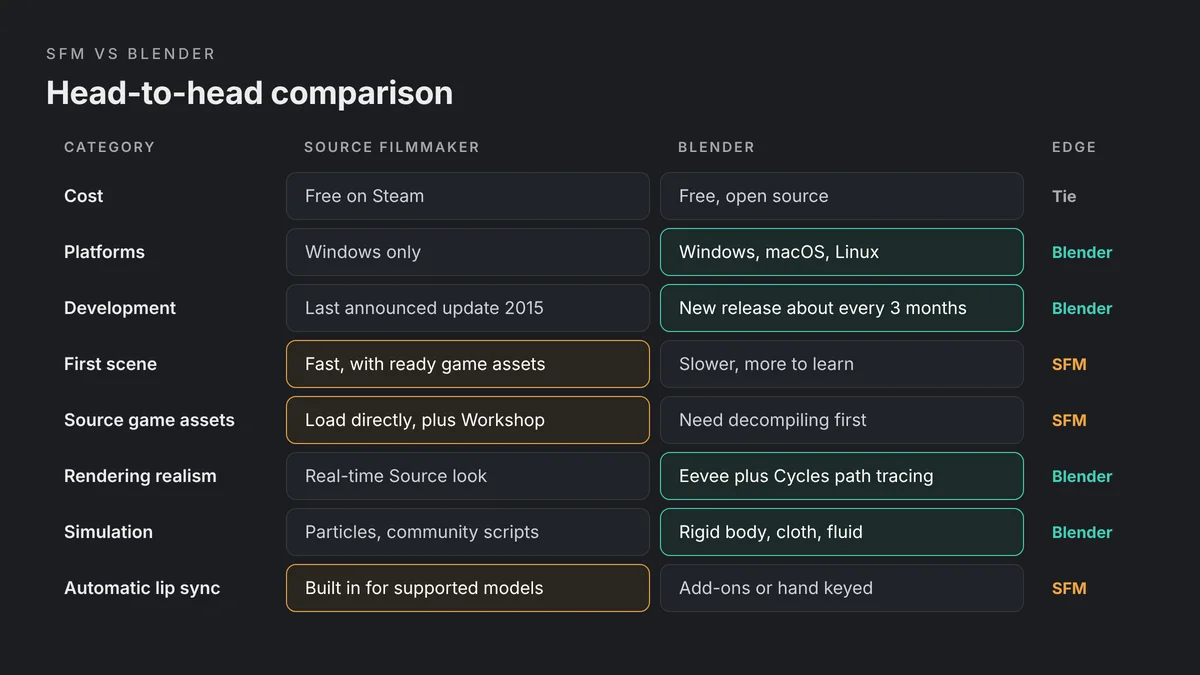
The table below sums up the main differences. Each row is explained in its own section further down.
| Feature | Source Filmmaker (SFM) | Blender |
|---|---|---|
| Price | Free on Steam | Free and open source (GNU GPL) |
| Engine or core | Source 1, Alien Swarm engine branch | Its own engine, with Eevee and Cycles renderers |
| Development | Last announced Steam update: 0.9.8.15 (January 2015) | New release about every three months; 5.2 LTS is current |
| Platforms | Windows only | Windows, macOS and Linux |
| Modeling | None; loads compiled Source models | Full modeling, sculpting and UV tools |
| Model formats | Compiled Source models (MDL) and Source maps | FBX, OBJ, glTF, USD, Alembic, STL, PLY and more |
| Rendering | Real-time engine with progressive refinement | Eevee (real-time) and Cycles (path tracing) |
| Animation tools | Motion Editor, Graph Editor, rig scripts | Graph Editor, Dope Sheet, NLA, constraints, Rigify |
| Lip sync | Automatic phoneme extraction on supported models | Shape keys keyed by hand or with add-ons |
| Physics | Particles; rigid bodies and cloth through community scripts | Rigid body, cloth, soft body, fluid and particles |
| Best for | Fan animations with Source game characters | General 3D animation, film, games and art |
What Source Filmmaker Is in 2026
Source Filmmaker is Valve’s movie-making tool for the Source engine. Valve built it for its own shorts, such as the Meet the Team videos for Team Fortress 2. The Steam store page describes it as the tool “built and used by us here at Valve to make movies inside the Source game engine.”
Its biggest strength is that it uses game assets directly. Anything that exists in a supported Source game can appear in your film. You place characters in a map, pose them, set lights and cameras, and render. There is no modeling step at all.
Engine Age and Development Status
SFM runs on an older version of Source 1. Valve’s Source Filmmaker wiki page says it runs on the Alien Swarm engine branch. The tool became a free public release in July 2012.
Development has been quiet for a long time. The last version announced on SFM’s Steam news feed is 0.9.8.15, released in January 2015. Valve’s wiki also notes that the official SFM website is no longer updated. The tool still installs and runs from Steam, and the community still uses it daily. However, you should not expect new features or official fixes.
What About Source 2 Filmmaker?
Valve did build a successor, often called Source 2 Filmmaker or S2FM. It is not a standalone download, though. Valve’s wiki says it is only available through the Workshop Tools for Counter-Strike 2, Dota 2, Half-Life: Alyx and SteamVR Home.
That means S2FM is tied to the game you install the tools for, and to that game’s content. It is a separate tool with its own workflow. So when people compare SFM vs Blender, they usually mean the original Source Filmmaker on Steam.
What Blender Is in 2026
Blender is a free, open source 3D suite. It covers modeling, sculpting, UV mapping, rigging, animation, simulation, rendering, compositing and video editing in one program. It also includes Grease Pencil for 2D animation inside a 3D scene.
Blender is under active development. Its manual says new versions arrive approximately every three months. At the time of writing, Blender 5.2 LTS is the current long-term support release. Each release adds features and fixes, so tutorials can age faster than SFM tutorials do. Check the version a tutorial uses before you follow it step by step.
Cost and Licensing
Cost is a tie. SFM is free to download from Steam. Blender is free to download from blender.org, and it is also available on Steam.
The licenses differ, though. Blender is released under the GNU General Public License. Its manual explains that you may use the program for any purpose, including commercial work. SFM is free proprietary software from Valve, and it is built around Valve’s game content. If you plan to sell an animation, check the rules that apply to the game assets you used. That applies to Source models loaded in either program.
Learning Curve: Which Is Easier?
SFM is usually quicker for a first result. You load a map, drop in a character from the model browser and start posing. The interface is focused on one job, so there are fewer menus to learn. A beginner can make a short posed scene in an afternoon.
The catch is that SFM has its own logic. Its Motion Editor works on time selections with falloffs, which feels unusual if you know other animation software. Our guide to the SFM Motion Editor and Graph Editor explains how both modes work. SFM can also crash during long sessions, so saving often is a habit worth building.
Blender asks for more patience at the start. It does far more, so the interface has more editors, modes and shortcuts. Basic navigation, selection and object modes take time to learn. On the other hand, Blender skills transfer well. Keyframes, F-curves, armatures and constraints work in similar ways in other 3D packages and game engines.
| Learning factor | SFM | Blender |
|---|---|---|
| Time to a first scene | Short, using ready-made game assets | Longer, since you build or import assets first |
| Interface size | Small and focused on filmmaking | Large, with many editors and workspaces |
| Skills that transfer | Mostly SFM and Source specific | Widely used across 3D animation and games |
| Up-to-date tutorials | Mostly older videos and guides | Constant flow of new tutorials |
Assets and Model Formats
Assets are where the SFM vs Blender gap is widest. SFM is a closed loop built around Source content. Blender is an open workshop that accepts almost any file.
SFM: Steam Workshop and Source Models
SFM ships with Team Fortress 2 content, and Valve released content packs for other Source games. The Steam Workshop adds thousands of community models, maps and props, and SFM syncs subscribed items into its own folder. Our guide on importing models from the SFM Workshop covers the process.
The limit is the format. SFM only loads compiled Source models, so you cannot open an FBX or OBJ file directly. Every outside model must be converted, given Source materials and compiled first. Broken paths are common along the way, which is why the purple checkerboard is so familiar to SFM users. Our SFM missing textures fix explains that error.
Blender: Almost Any Format
Blender imports and exports many standard formats. Its manual lists Alembic, BVH motion capture, USD, OBJ, PLY, STL and FBX, and glTF 2.0 support comes as a bundled add-on. That covers most models from asset stores, scans and other 3D programs.
Blender can also build anything you cannot find. You can model a prop, sculpt a character or kitbash a scene from parts. With the Blender Source Tools add-on, it can even read Source models after they are decompiled. That makes Blender the more flexible asset tool, even for people who animate in SFM.
Rendering: Progressive Refinement vs Eevee and Cycles
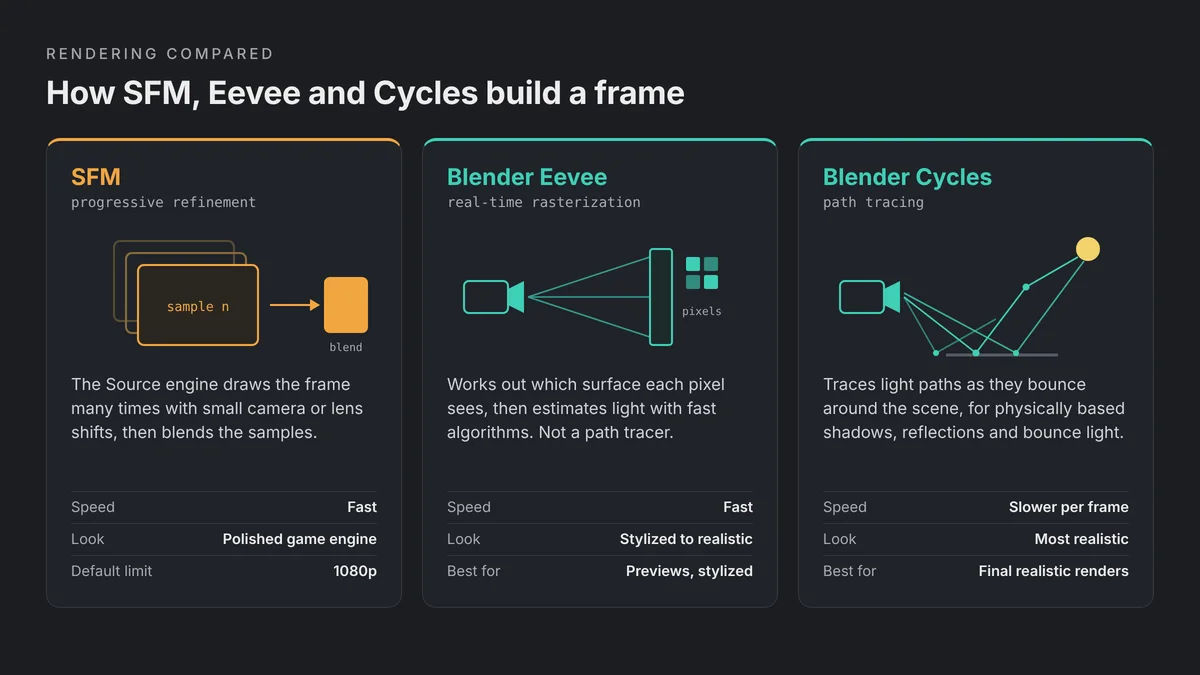
SFM renders in real time with the Source engine. While you work, the viewport shows a fast preview. Once the playhead stops, progressive refinement keeps adding samples to the still frame, so you can check depth of field, motion blur and ambient occlusion. The final render blends many samples per frame for smooth results.
SFM has limits, though. By default it caps rendering at 1080p, and you need the -sfm_resolution launch option for 1440p or 4K. Lighting also follows an older game engine, so it looks closer to a polished game than to a feature film. Our best SFM render settings guide covers sample counts and export choices.
Blender gives you two main engines. Its manual describes Eevee as a real-time engine based on rasterization, not a path tracer. It is fast and good for stylized work and quick previews. Cycles is Blender’s physically based path tracer for production rendering, and it can use the GPU. Both share the same shader nodes, so you can preview in Eevee and switch to Cycles later.
| Renderer | Method | Strength | Trade-off |
|---|---|---|---|
| SFM | Real-time Source engine with sample blending | Fast, game-accurate look for Source assets | Older lighting; 1080p by default |
| Blender Eevee | Real-time rasterization | Fast previews and stylized renders | Less physically accurate than Cycles |
| Blender Cycles | Physically based path tracing | Realistic light, shadows and reflections | Much slower per frame |
Rigging and Animation Tools
Both tools can produce smooth character animation. They simply take different routes to it.
Graph Editors and Keyframes
SFM has two animation modes. The Motion Editor changes poses across a time selection with soft falloffs. The Graph Editor handles exact keyframes and curve tangents. Valve’s documentation says animation changes happen only in these two modes.
Blender works with keyframes everywhere. Its Graph Editor edits F-curves, which describe how each property changes over time. The Dope Sheet gives a fast overview of timing. The NLA editor stacks reusable actions like layers, so you can blend a walk cycle with an upper-body gesture.
IK and Rigs
In SFM, rigs come from Python scripts. The bundled rig_biped_simple script adds IK handles for arms and legs, plus knee and elbow controls. It works well on standard bipeds, but unusual skeletons need custom scripts. Our SFM rigging guide shows how to apply and fix these rigs.
Blender gives you full control. You build armatures yourself, add an Inverse Kinematics constraint to any bone chain and set up drivers or custom controls. The bundled Rigify add-on can generate a complete character rig from a template. That flexibility takes longer to learn, but you are never limited to what a script supports.
Lip Sync and Facial Animation
Lip sync is one area where SFM can save real time. It can analyze an audio clip and write mouth animation onto the face controls automatically. Valve’s documentation says this phoneme extraction only works on Team Fortress 2 HWM class models and on models that follow the Half-Life 2 FACS facial layout. Other models need phoneme presets built by hand first.
Blender has no built-in automatic lip sync. Facial animation usually relies on shape keys, which Blender’s manual describes for mouth positions, expressions and phonemes. You key them by hand, drive them from bone controls or use third-party add-ons. The result can be more precise, but it takes more setup. See our SFM lip sync tutorial for the SFM side of the process.
Physics and Simulation
Blender wins this category clearly. Its manual covers rigid bodies, cloth, soft bodies, fluids, particle systems, dynamic paint and force fields. Simulation nodes add procedural effects as well. You can bake a simulation and render it with the rest of your scene.
SFM focuses on particles. Its Particle Editor handles fire, smoke, sparks and muzzle flashes using Source particle systems. For rigid bodies, ragdolls, ropes and cloth, the community relies on Python scripts such as sfmphys. Those scripts need properly set-up models, and they do not collide with level geometry. For heavy simulation, Blender is the practical choice.
Platform Support and System Requirements
SFM is a Windows program. Its Steam store page lists Windows only, with no macOS or Linux version. The listed minimum specs are modest, from a Windows 7 era PC with 2 GB of RAM and at least 15 GB of disk space. In practice, a 64-bit copy of Windows 10 or 11 is the realistic choice now, since current Steam clients need Windows 10 or later.
Blender runs on Windows, macOS and Linux. Its download page offers builds for Windows on x64 and Arm, macOS on Apple Silicon and Linux. Heavy Cycles renders benefit from a strong GPU, but Blender scales down to modest machines for simple scenes.
Community, Tutorials and Support
Both tools have large communities, but their momentum differs. SFM has years of YouTube tutorials, Steam guides and discussion threads. Much of that knowledge is still valid, because the software barely changes. The downside is that many guides are old, and some links or downloads have disappeared.
Blender’s community keeps growing. The official manual is updated with each release, and new tutorials appear every day. You will find courses on character animation, rigging, rendering and game assets. When something breaks, you are more likely to find a fresh answer for Blender than for SFM.
Moving Models Between SFM and Blender
You do not have to pick just one tool. Many SFM creators use Blender as their model workshop. The bridge is the Blender Source Tools add-on, which Valve’s wiki says lets Blender import and export SMD and DMX files. It also supports QC files and can compile models. The current version needs Blender 4.1 or later.
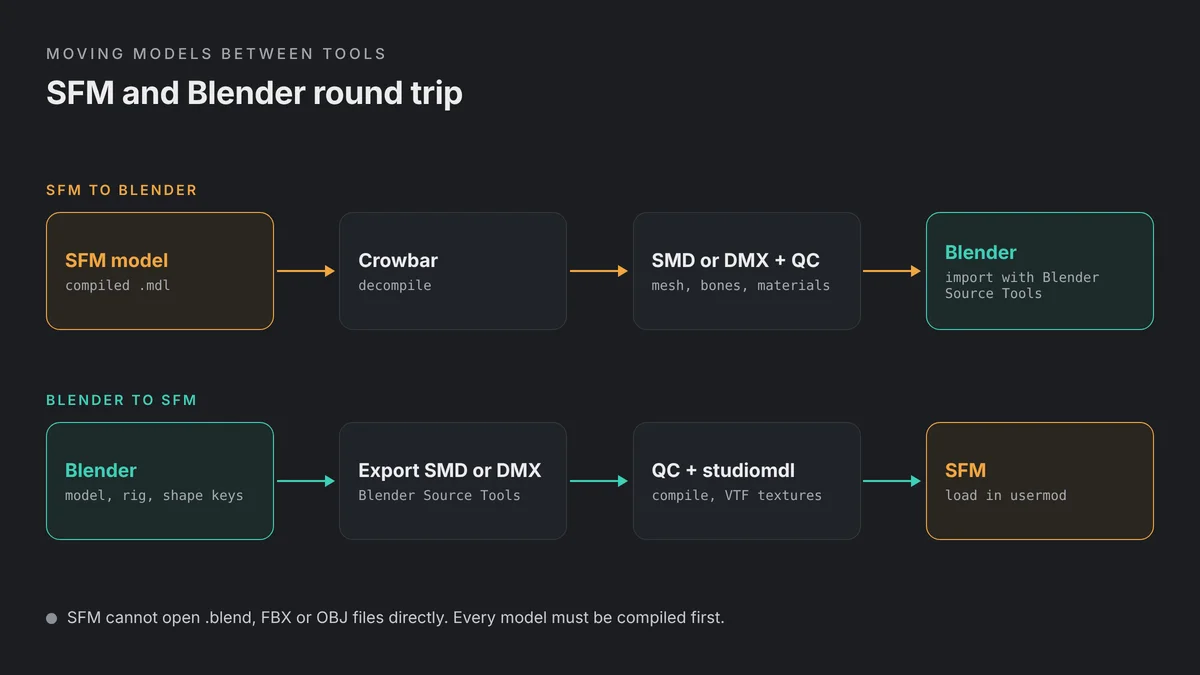
Going from SFM to Blender, you first decompile the compiled model with Crowbar. That gives you SMD or DMX files plus a QC file, which Blender Source Tools can import. Our Crowbar tutorial walks through the decompile.
Going from Blender to SFM, you export SMD or DMX, write a QC file, convert textures to VTF and compile with studiomdl. Our Blender to SFM porting guide covers each step, from material names to the final compile.
Decompile
Use Crowbar to turn a compiled SFM model into SMD or DMX files and a QC.
Edit in Blender
Import with Blender Source Tools, then fix the mesh, rig or materials.
Export and compile
Export SMD or DMX, then compile with studiomdl through the QC.
Test in SFM
Load the model in a fresh session and check the console for errors.
SFM vs Blender: Verdict by User Type
There is no single winner in the SFM vs Blender debate. The right tool depends on who you are and what you want to make.
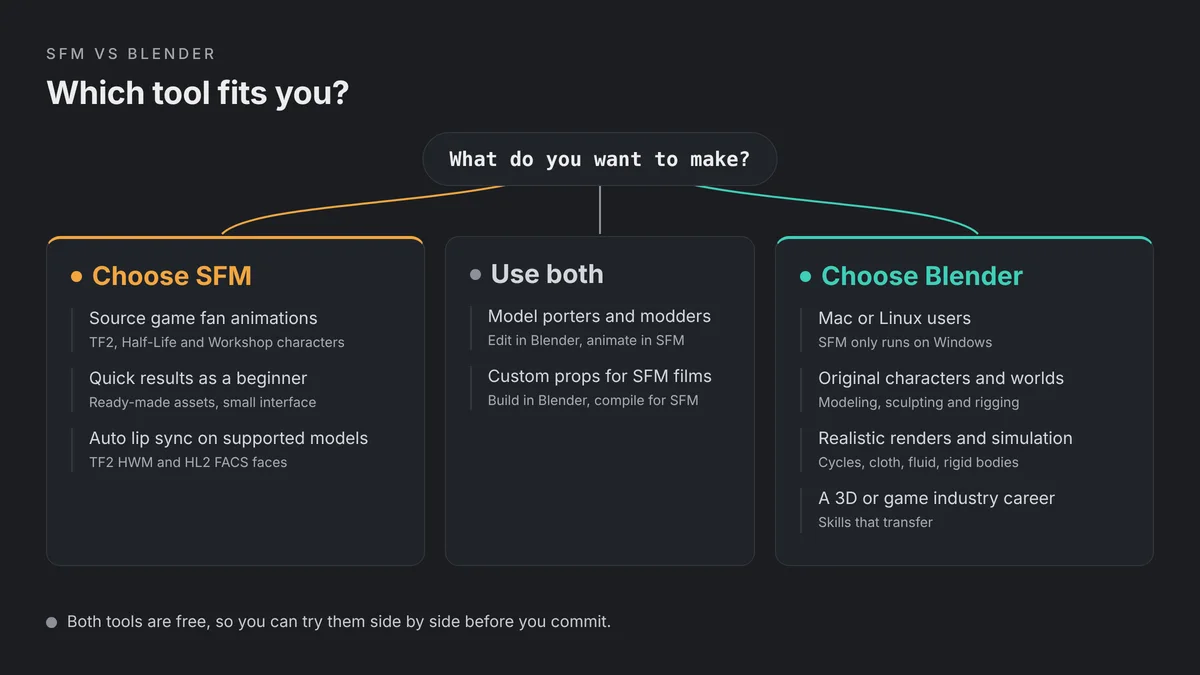
| You are | Best choice | Why |
|---|---|---|
| A TF2, Half-Life or Source game fan | SFM | Characters, maps and Workshop items load directly |
| A complete beginner who wants quick results | SFM | Ready-made assets mean less setup before you animate |
| On a Mac or Linux computer | Blender | SFM only runs on Windows |
| Making original characters or worlds | Blender | Full modeling, sculpting and rigging tools |
| Aiming for realistic renders | Blender | Cycles path tracing and modern shading |
| Planning a 3D or game industry career | Blender | Skills transfer to other 3D software and engines |
| A model porter or modder | Both | Edit in Blender, then compile and animate in SFM |
If you want to make fan animations with Source game characters, start with SFM. You will get results quickly, and the Workshop gives you a huge cast. If you want to learn 3D as a skill, start with Blender. It is harder at first, but it keeps improving and it can make anything. Many creators learn both, and the two tools work well together.
SFM vs Blender FAQs
Is Blender better than SFM?
Blender is more capable overall, with modeling, simulation, modern rendering and active development. SFM is better for quick fan animations with Source game characters. The better tool depends on your project.
Is SFM still updated in 2026?
Not in any major way. The last version announced on SFM’s Steam news feed is 0.9.8.15 from January 2015. The tool still runs from Steam, but you should not expect new features.
Is SFM easier to learn than Blender?
For a first scene, usually yes. SFM loads ready-made game assets and has a smaller interface. Blender takes longer to learn, but its skills transfer to other 3D software.
Can I use SFM models in Blender?
Yes. Decompile the model with Crowbar to get SMD or DMX files and a QC, then import them with the Blender Source Tools add-on.
Can I use Blender models in SFM?
Yes, but they must be converted. Export SMD or DMX with Blender Source Tools, write a QC file, convert textures to VTF and compile the model with studiomdl.
Does SFM work on Mac or Linux?
No. Source Filmmaker is listed on Steam for Windows only. Blender runs on Windows, macOS and Linux.
What is Source 2 Filmmaker?
It is Valve’s newer filmmaking tool for Source 2. It is not a standalone download and is only available through the Workshop Tools for games such as Counter-Strike 2, Dota 2 and Half-Life: Alyx.
Which is better for lip sync, SFM or Blender?
SFM can generate lip sync automatically from audio on supported models, which saves time. Blender has no built-in automatic lip sync, so you animate shape keys by hand or use add-ons.