

Quick Answer
A Crowbar decompile SFM workflow turns a compiled MDL file back into editable source files. Crowbar decompiles the model into a QC file and SMD files, you edit them in a text editor or Blender, and StudioMDL compiles them back into game\usermod\models. Finally, check skins, bodygroups and sequences in HLMV, then load the rebuilt model in SFM.
Crowbar Decompile SFM Models: The Full Workflow at a Glance
A crowbar decompile sfm workflow turns a compiled MDL file back into editable source files. You then change those files and rebuild them into a new model that Source Filmmaker can load, pose, and animate. For the full compile side of the workflow, from QC file to finished .mdl, see our SFM compile guide.
The loop has four stages. Crowbar decompiles the model into a QC file and SMD files. You edit them, and StudioMDL compiles them. Finally, you test the result inside SFM before using it in scenes.
This guide follows that exact order with real folder paths and option names. It suits animators who want to recompile custom models, fix broken ports, rename props, or add simple new skins and bodygroups safely.
Decompile
Crowbar turns the MDL and its companion files into a QC file and SMD files in a work folder.
Edit
Change the QC in a text editor, or edit the SMD meshes in Blender when the geometry itself must change.
Compile
StudioMDL, run from Crowbar’s Compile tab, rebuilds the model into game\usermod\models.
Test
Check skins, bodygroups and sequences in HLMV, then load the model in SFM.
What Is Crowbar and Who Makes It?
Crowbar is a free Windows tool written by ZeqMacaw. The Valve Developer Community notes it began as a replacement for the older MDLDecompiler. It has since grown into a modding toolset for many Valve games.
It supports both GoldSource and the Source engine, which covers Source Filmmaker. Its source code is written in Visual Basic. The project lives on GitHub, where anyone can freely read, build, test, and audit it.
Beyond decompiling, it includes a VPK unpacker, a model previewer, a compiler front end, and Steam Workshop download and publish tools. This crowbar tutorial focuses on the decompile and compile tabs that SFM users need.
How to Download Crowbar From Official Sources
Download Crowbar only from the official Crowbar releases page on GitHub or the official Crowbar Steam group. The newest build listed there is Crowbar 0.74, released in February 2023 as a compressed 7z archive file.
Extract the archive with 7-Zip into any folder you like, even a USB drive. Crowbar is a portable application, so there is no installer. Double-click Crowbar.exe, and later builds can update through the Update tab.
ZeqMacaw advises that many features need you to run as administrator. Right-click the executable and choose that option each time. This avoids strange access errors when Crowbar reads game folders or writes compiled model files.
How to Set Up Crowbar for Source Filmmaker
Open the Set Up Games tab and select the Source Filmmaker entry from the drop-down list. Each game setup stores the paths that Crowbar passes to Valve’s own compiler and model viewer tools every time.
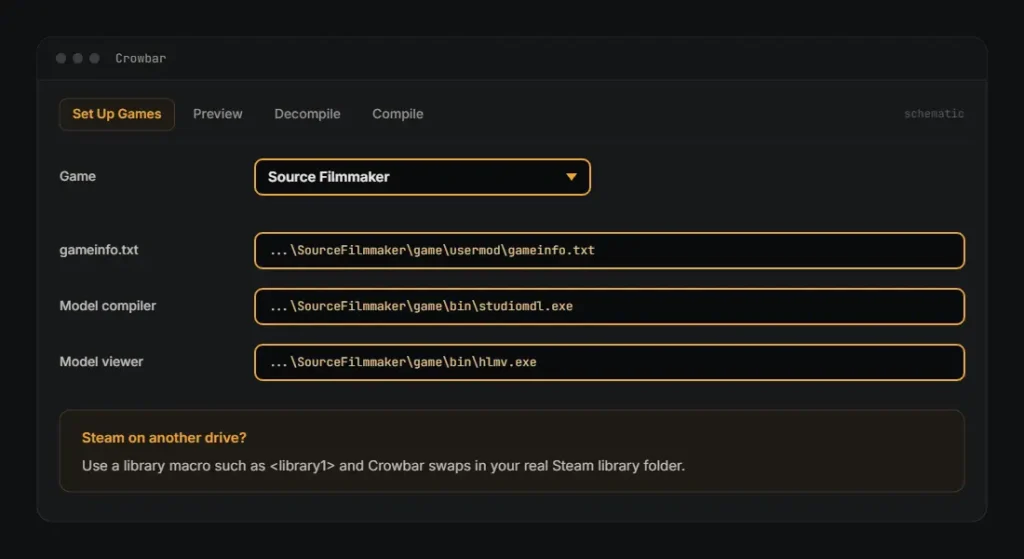
Point the gameinfo field to the gameinfo.txt file in SourceFilmmaker\game\usermod. Next, point the compiler field to studiomdl.exe and the viewer field to hlmv.exe. Both of these executables sit inside the SFM bin folder at SourceFilmmaker\game\bin.
gameinfo.txt   ...\SourceFilmmaker\game\usermod\gameinfo.txt
studiomdl.exe  ...\SourceFilmmaker\game\bin\studiomdl.exe
hlmv.exe       ...\SourceFilmmaker\game\bin\hlmv.exe
If Steam sits on another drive, use a library macro such as <library1>. Crowbar swaps it for your real Steam library folder. First time with SFM? Read how to install Source Filmmaker on Windows first.
What Files Make Up a Compiled SFM Model?
A compiled model is never just one file. The MDL holds the skeleton, animations, hitboxes, and material names. The .vvd file stores vertex data, and the .dx90.vtx file holds optimized mesh strips for DirectX 9.
A .phy file appears only when the model has a collision mesh. Some models ship an .ani file for animation blocks. Crowbar reads all of these together, so keep every companion file in one folder.
Decompiling produces the opposite set. The reference mesh becomes an SMD, each animation becomes its own SMD, and the QC file ties them together. Every file is plain text, so editing tools can open them.
How to Decompile an MDL File in Crowbar
Here is how to decompile mdl files step by step in Crowbar. Open the Decompile tab. Then set MDL input to a single file, a folder, or a folder with subfolders for large batch jobs.
Set Output to a clean work folder outside the SFM game directory. This keeps raw source files away from the folders SFM scans. Then press the Decompile button and watch the progress messages scroll past.
Read the decompile log when the run ends. It lists every file Crowbar wrote and any warnings. If the result looks right, press Use All in Compile to send the QC files straight to compiling.
Which Decompile Options Should SFM Users Turn On?
Tick Folder for each model so each model gets its own clean subfolder. Keep the QC file, Reference mesh SMD file, and Bone animation SMD files checked, plus anims subfolder placement to keep animations tidy.
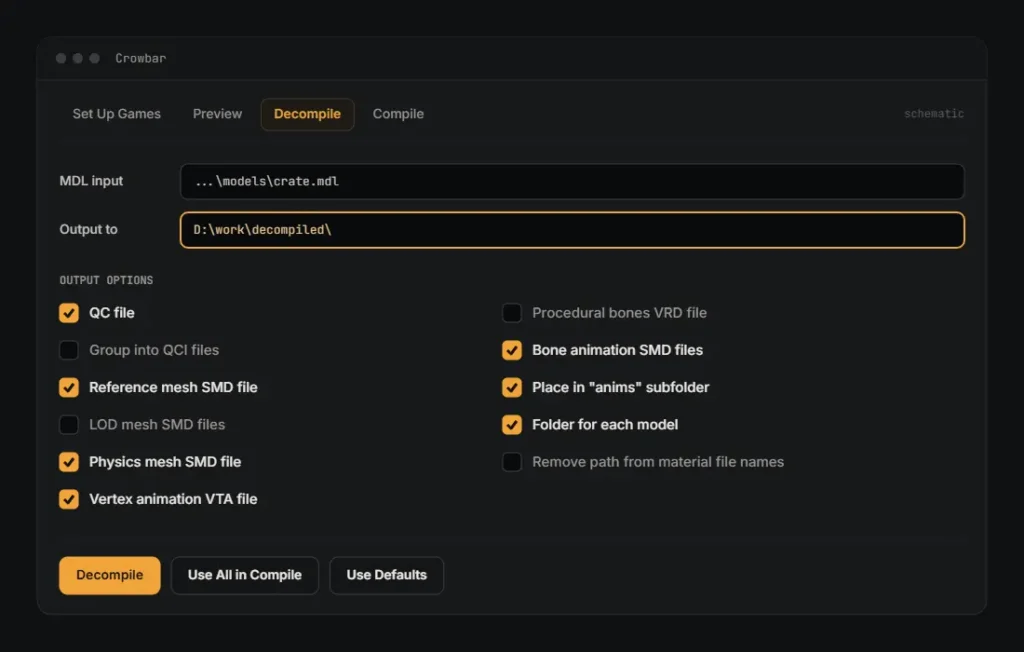
Enable Physics mesh SMD file for props with collisions and Vertex animation VTA file for faces with flexes. Add LOD mesh SMD files only when LODs matter, and Procedural bones VRD file for helper bones.
Tick Remove path from material file names if your 3D program mangles long paths. If anything looks wrong, the Use Defaults button restores ZeqMacaw’s recommended settings. You can then adjust single boxes again with confidence.
How to Read and Edit the QC File
Open the QC in any text editor, such as Notepad. The $modelname line sets the output path relative to the models folder. Change it, such as $modelname "mymods/crate_red.mdl", so you never overwrite the original model.
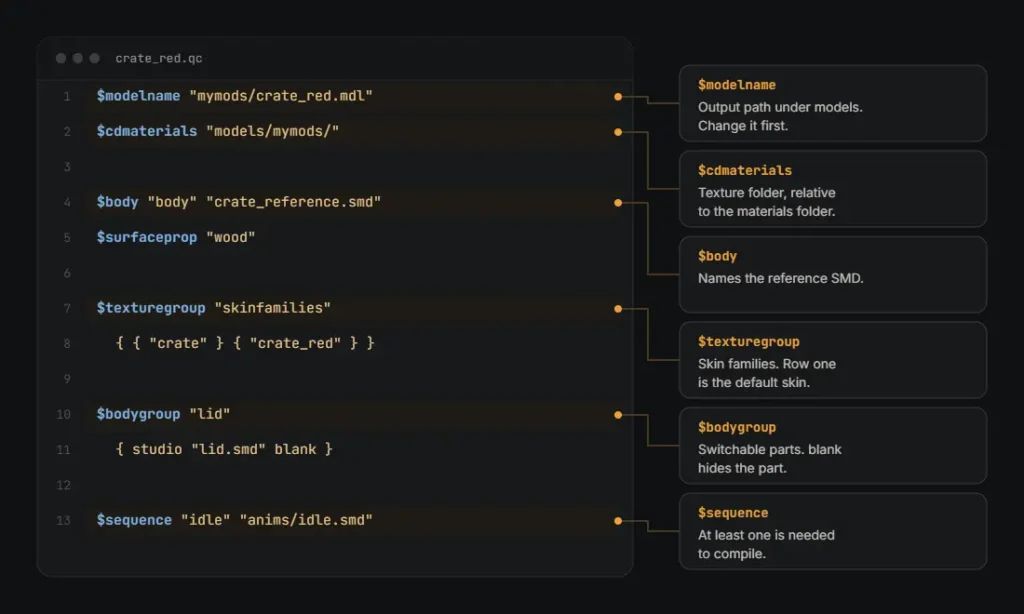
The $cdmaterials line tells the compiled model where its textures live, relative to the materials folder. The $body line names the reference SMD, and every model needs at least one $sequence line to compile successfully.
Other common lines include $surfaceprop for impact sounds and $collisionmodel for the physics mesh. Keep any $definebone lines Crowbar wrote, since they preserve bone positions. The Valve Developer Community QC page lists every QC command.
How to Use $bodygroup and $texturegroup in the QC
A $bodygroup block lets animators switch parts on and off in SFM. Each entry inside the curly braces names one submodel SMD. A blank entry adds an empty option that simply hides that part entirely.
A $texturegroup block creates skins. Each row is one skin family, and every row must list the same number of materials in the same order. The first row is always the default skin, numbered zero.
Crowbar can split long scripts with Group into QCI files. The main QC then pulls them in with an $include line. This keeps bodygroup and skin sections readable when a character has dozens of parts.
How to Compile a Model in Crowbar
To crowbar compile model files, open the Compile tab and set QC input to your freshly edited QC file. Under Game that has the model compiler, choose the Source Filmmaker game setup you created before.
Tick Write log to a file so every message is saved. Keep Verbose on for detailed output and No P4 on to silence a Perforce warning. Then press Compile and wait for it to finish.
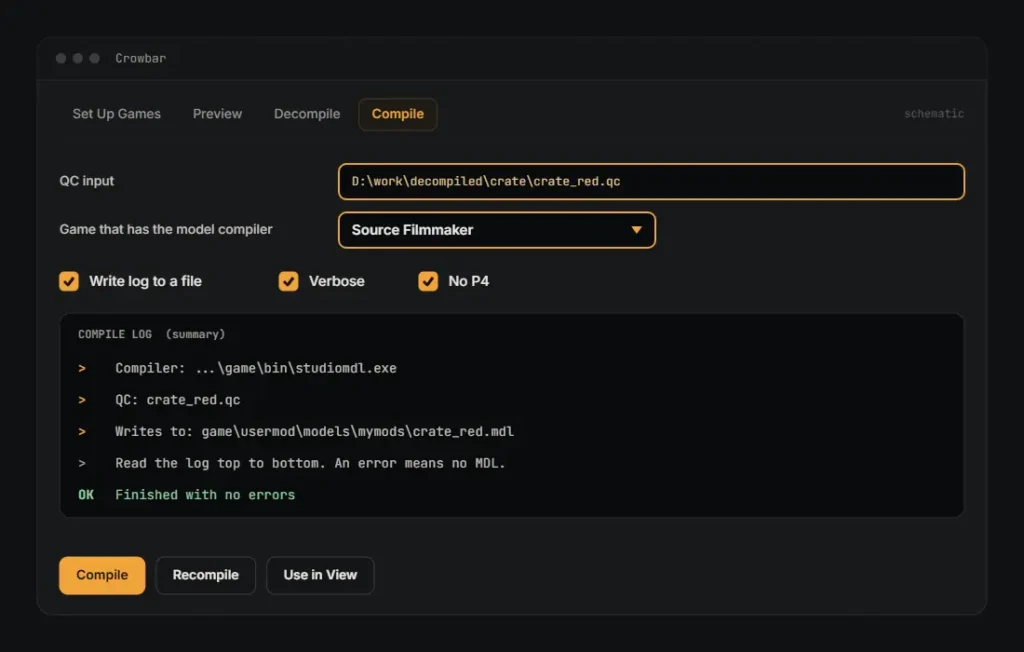
Read the compile log from top to bottom. When StudioMDL hits an error, it produces no MDL for that QC. Fix the reported line, then press Recompile to rerun the same QC without reselecting files.
Where Do Compiled Models Go in usermod?
StudioMDL writes its output into the models folder of whichever game is set in gameinfo.txt. For a standard SFM install, that is game\usermod\models, followed by whatever subfolder path you wrote in the $modelname line earlier.
Materials must mirror that layout under materials\models. SFM loads files only from folders on its search path, and usermod is enabled by default. Extra custom content folders need adding in the SFM SDK launcher first.
Restart SFM after compiling a brand new model. Open the model browser from the Animation Set Editor, then search for the folder name you set earlier. If nothing appears, your $modelname path is usually wrong.
How to Preview the Model in HLMV and SFM
Test every compile in the Half-Life Model Viewer before opening SFM itself. HLMV loads much faster, shows skins and bodygroups, and plays each sequence. It usually exposes most problems within seconds instead of several minutes.
Crowbar’s Viewer tab opens HLMV with your freshly compiled model already loaded. Press Use in View after compiling to send it there automatically. The Preview tab shows model information, including the full Material Folders list.
Use View as Replacement when you want to check an edited copy without touching the original model. Once the model looks right in HLMV, load it in SFM and test lighting, posing, and facial flexes.
How to Fix Materials With VTFEdit, VMT and VTF Files
Source textures use two separate files. A VTF file stores the image data itself. A VMT file is a short text script that tells the game engine which shader and which textures that material uses.
VTFEdit converts images such as TGA or PNG into VTF. It builds mipmaps, applies DXT compression, and creates simple VMTs. It runs on VTFLib, needs .NET 3.5, and has an updated fork called VTFEdit Reloaded.
A basic character VMT uses the VertexLitGeneric shader with a $basetexture line. That path is relative to the materials folder and drops the file extension. Every VMT name must match the SMD material name exactly.
What Are the Most Common Crowbar Compile Errors?
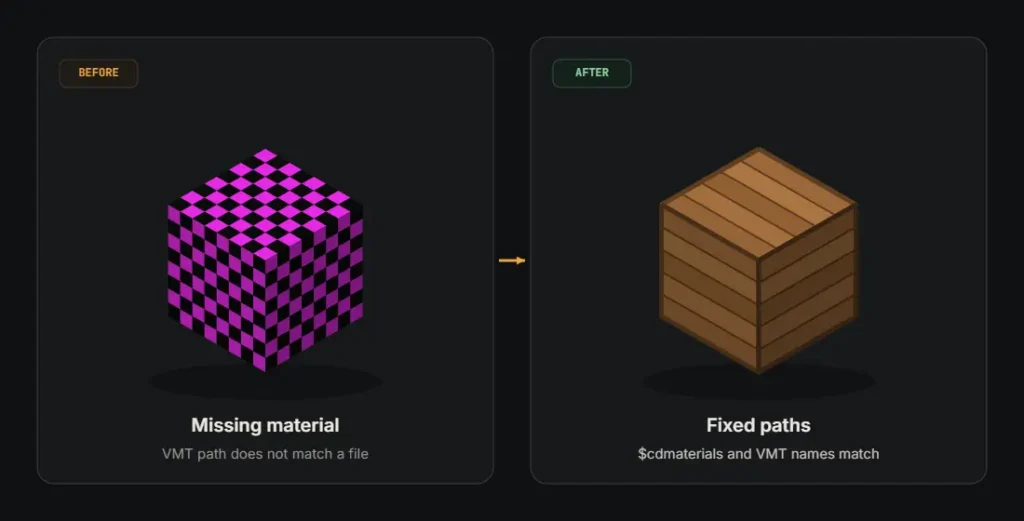
A purple checkerboard on the model means missing materials. Check that $cdmaterials matches the folder name, every VMT exists, and each $basetexture points to an existing VTF. Fixing those three items solves most texture problems.
“ERROR: model has no sequences” means the QC lacks a valid $sequence line, often from a missing quote or brace. The log usually reports a line number, so open the QC and check that line.
Mesh and bone limit errors are hard caps. In Source SDK 2013 headers, MAXSTUDIOBONES is 128 bones and MAXSTUDIOVERTS is 65,536. Too many vertices errors mean you must split the mesh into smaller separate parts.
How to Respect Model Authors When Decompiling
Decompiling is a learning and repair tool, not permission to claim someone else’s work. Every model has real model authors, and many publish clear rules about edits, ports, reuploads, and commercial use of their creations.
Ask for permission before sharing an edited model, and always give credit to the original creator. Keep edits for personal use when the license is unclear. Never post another artist’s work as your own upload.
Valve game assets carry their own terms, and redistribution outside approved channels can break them. When in doubt, share only your QC changes and point others to the original download page instead of your files.
Crowbar Decompile and Recompile FAQs
Is Crowbar Free and Safe to Use?
Yes, Crowbar is free and its full source code is public on GitHub. Download it only from the official releases page or the official Crowbar Steam group, never from random mirror sites or reupload links.
Each GitHub release lists a SHA1 checksum for its archive. Compare that value against your download using any free hash tool. A matching checksum confirms that nobody has altered the file since ZeqMacaw published it.
The repository includes a LICENSE.txt file that sets the usage terms for the code. Crowbar simply keeps its settings in your AppData folder and only writes model files where you point its Output to setting.
Can Crowbar Decompile Source 2 Models?
No, Crowbar targets GoldSource and Source 1 models only, which includes SFM. It cannot open Source 2 formats. That rules out current Dota 2 models and any assets built for Source 2 Filmmaker as well.
The Pte Jack guide also lists Titanfall 2 models as unsupported because they use a newer internal format. Some recent Source 1 branches decompile only partly, so always test the result before relying on it.
Decompiles are close copies, not perfect originals. ZeqMacaw notes that some animations differ slightly, and delta animations recompile fine but are hard to edit. Plan to carefully check every sequence in HLMV after each rebuild.
Why Is My Recompiled Model Purple and Black?
A pink-and-black pattern means SFM cannot find a material file. The model itself compiled correctly. However, the VMT path built from $cdmaterials and the SMD material name does not match any real file on disk.
Open the Preview tab in Crowbar and read the Material Folders list. Then compare each listed name with your actual VMT files under game\usermod\materials. Spelling, folder depth, and capitalization differences all cause this exact problem.
Also confirm each VMT points to an existing VTF through $basetexture. If the decompile used full paths, enable Remove path from material file names. Then decompile the model again, and recompile to clean material names.
What Is the Bone Limit for SFM Models?
The public Source SDK 2013 headers set MAXSTUDIOBONES to 128, so plan your rig around 128 bones. A model above that limit fails to compile, so trim the extra skeleton bones in Blender before exporting.
Blender Source Tools shows a warning when an SMD export exceeds 128 bones. Community reports suggest DMX exports may allow more bones in some branches, but the SFM compiler result is the only reliable test.
To trim a rig, remove unused jiggle bones first, then extra accessory bones such as belts, pouches, and pockets. Removing face bones works for background characters that never need close-up facial animation in your shots.
Do I Need Blender to Use Crowbar?
No, Crowbar decompiles and compiles models without any 3D program installed at all. You only need Blender to change the mesh geometry itself, such as moving vertices, splitting parts, or editing the UV maps directly.
For QC-only edits, such as renaming the model or adding skins, a plain text editor is enough. Blender becomes useful once you need to import SMD files, reshape geometry, and save your changes back out.
Use Blender Source Tools to export edited meshes back to SMD or DMX. Keep the exact same bone names and material names during export, or the recompiled model will lose its weights, textures, or both.
Why Does Crowbar Say It Finished but No Model Appears?
The usual cause is simply a wrong output path. Crowbar finishes, but the compiled model lands in a different folder than you expected. Either the $modelname path or the gameinfo.txt setting points somewhere else entirely.
Check the compile log for the final write path. Then confirm the game setup uses usermod\gameinfo.txt, not another game’s file. Also confirm the log shows no errors, since a failed compile writes no MDL file.
If decompiling fails with “Model version not currently supported,” run Crowbar as administrator and try the decompile again. Finally, restart SFM so the model browser rescans usermod and lists the new model in its folder.