
Quick Answer
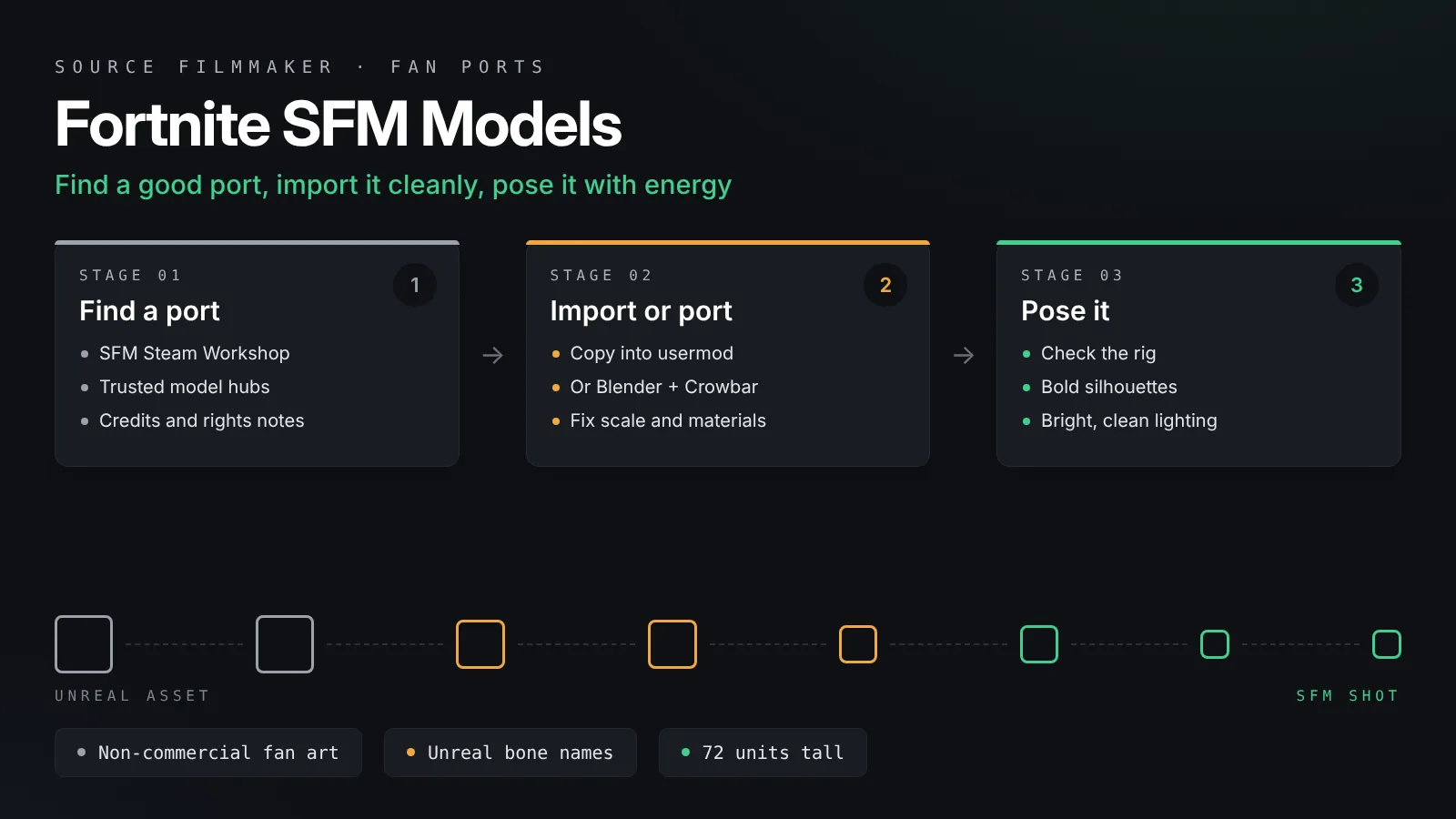
Fortnite SFM models are always fan ports, because Fortnite runs on Unreal Engine and Epic Games owns the characters. Find a credited port on the Steam Workshop or a trusted model hub, subscribe or copy it into usermod, and restart SFM. Raw files need porting through Blender Source Tools and Crowbar. Keep your work non-commercial.
Fortnite characters are some of the most requested models in the Source Filmmaker community. Their bold shapes and bright colors suit SFM posters and short animations well. Fortnite is not a Source game, though, so its characters never come with SFM out of the box. Every Fortnite SFM model you see is a fan port that someone converted to the Source format. This guide explains where those ports come from, how to import them, how to port raw files yourself, and how to pose the characters so they feel like Fortnite.
Before anything else, a short note on rights. Fortnite characters and assets belong to Epic Games. Fan ports are shared under Epic’s fan content rules at best, so keep your work non-commercial, credit the original creators and the porter, and respect any takedown.
The short version:
Find a fan port on the Steam Workshop for SFM or a trusted community model hub, and read its notes on rights and credits.
If it is a ready SFM port, subscribe or copy its models and materials folders into usermod, then restart SFM.
If you only have raw files, port them through Blender with Blender Source Tools, then write a QC and compile it with Crowbar.
Load the model, check its rig and face controls, and pose it with strong silhouettes and Fortnite-style energy.
What Fortnite SFM Models Really Are
Knowing how a port was made tells you what to expect from it.
Ported, not official
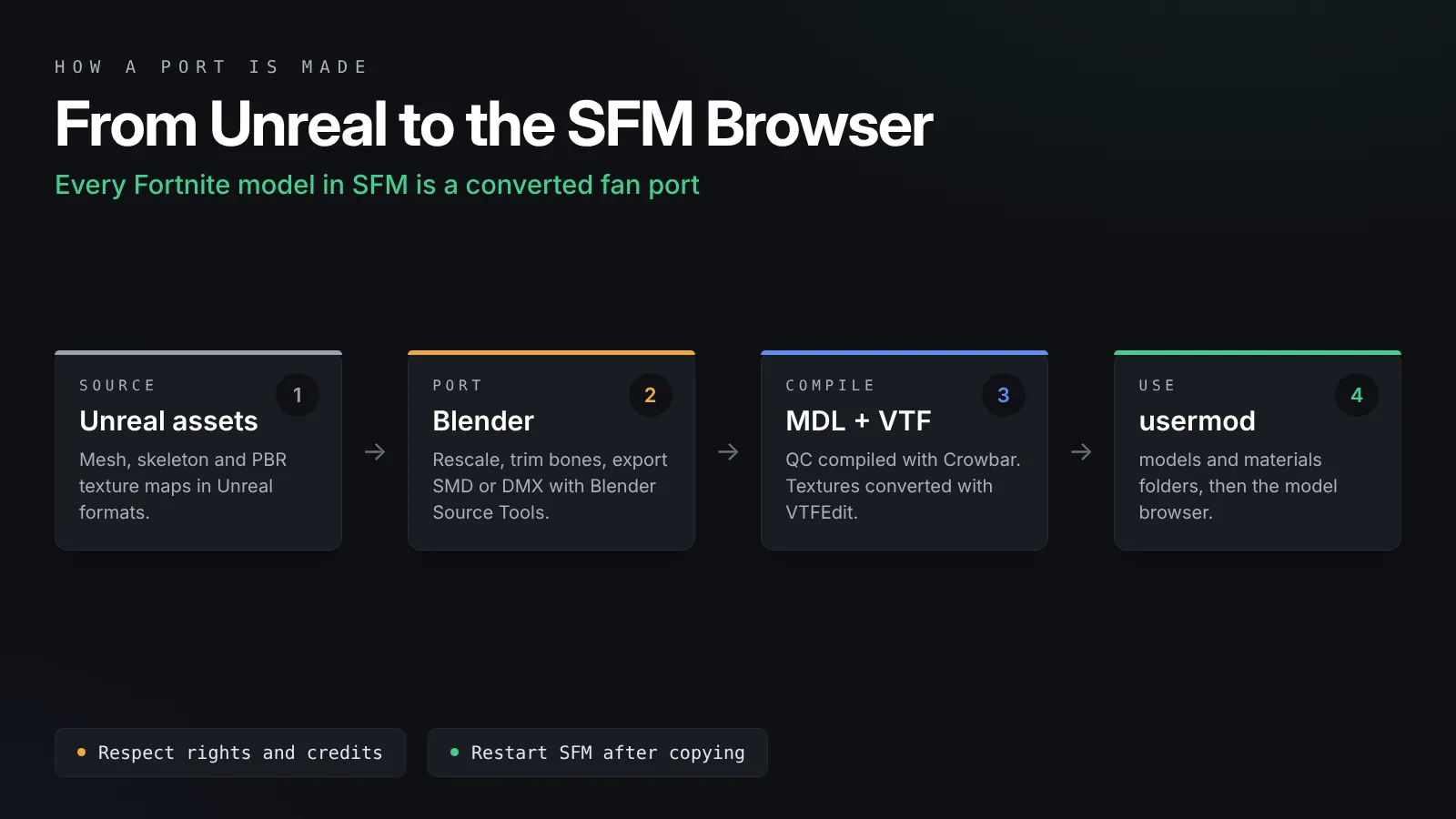
Fortnite runs on Unreal Engine, which uses different model and texture formats from Source. A fan porter converts the mesh, skeleton and textures into a compiled MDL with VTF and VMT materials. The quality depends on the porter’s care, so two ports of the same skin can behave very differently.
Unreal skeletons are different
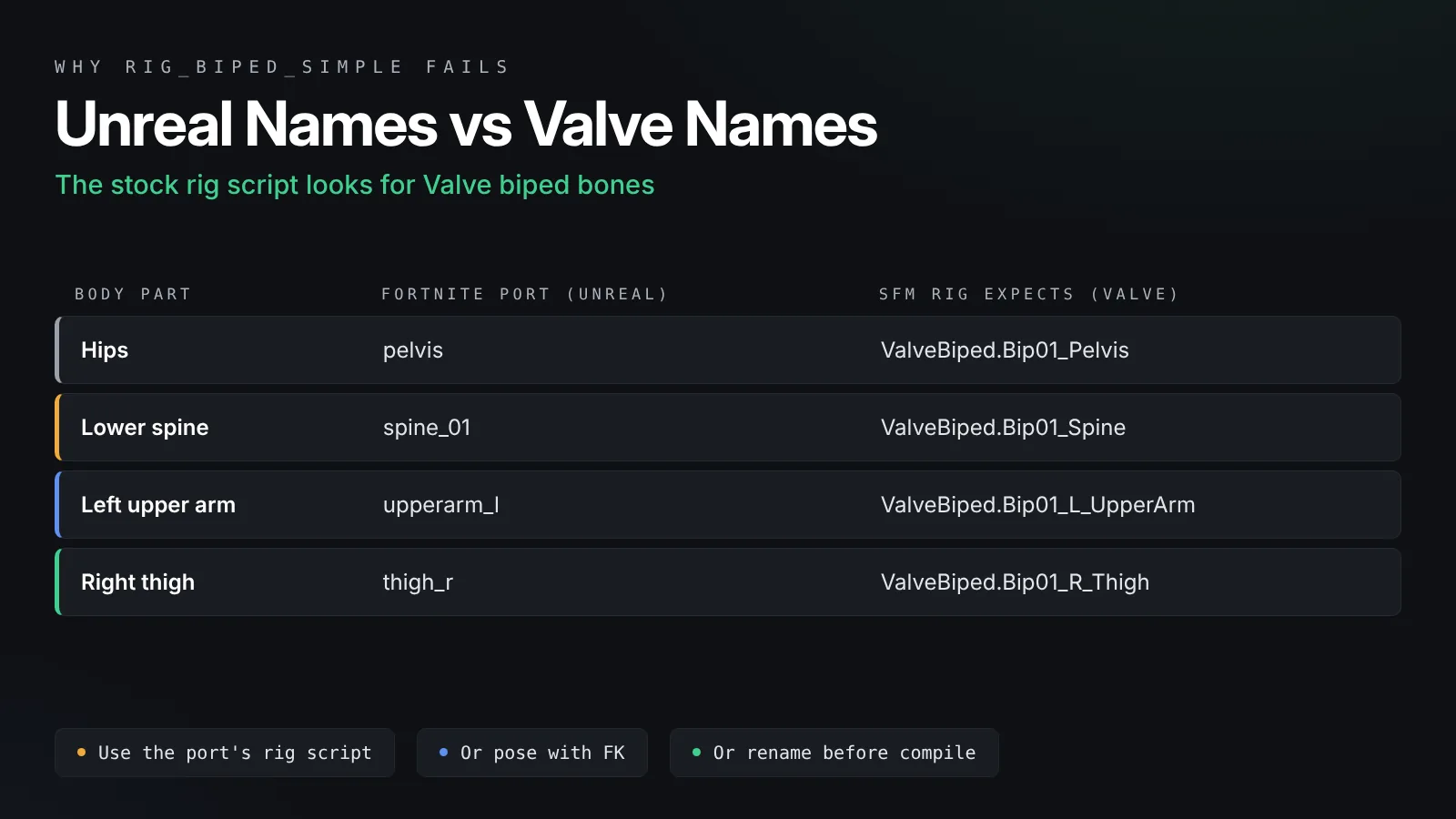
Fortnite characters use an Unreal style skeleton with bone names such as pelvis, spine_01, upperarm_l and thigh_r. Most SFM rigs and scripts expect Valve’s naming, such as ValveBiped.Bip01_Pelvis. This one difference causes most of the posing problems people run into, and we cover it below.
Rights and fair use
Epic owns the characters. Using fan ports for personal, non-commercial fan art is common in the community, but it is still your responsibility to follow Epic’s fan content rules and each porter’s terms. Never sell renders of Fortnite characters or repackage someone else’s port as your own.
Where to Find Fortnite SFM Models
Stick to sources that show who made the port and what is included.
Steam Workshop for SFM
The Source Filmmaker Steam Workshop is the easiest place to start. Search for Fortnite or for the character’s name. Workshop items install automatically, show comments from other users and stay updated when the porter fixes something.
Community model hubs
Many porters also share their work on community model sites and on their own pages. These downloads usually come as a zip with models and materials folders. Read the description for required items, credits and any content warnings, and scan downloads with your antivirus before opening them.
What to check before you download
A good port page lists the included skins or variants, whether facial flexes or face bones are included, whether a rig script is provided, and the bodygroups for back blings, pickaxes and accessories. Comments that mention broken textures or missing files are a warning sign.
Importing a Ready SFM Port
If the port already contains compiled MDL files, importing takes a few minutes.
Workshop items
Subscribe, wait for Steam to finish the download, then fully close and reopen SFM. If the model does not appear, our guide to importing SFM models from the Steam Workshop covers the folder layout and search paths step by step.
Manual downloads
Extract the zip and look inside. You should see a models folder with .mdl, .vtx, .vvd and usually .phy files, and a materials folder with .vmt and .vtf files. Copy both folders into SourceFilmmaker\game\usermod, merging with any folders already there. Keep the same folder structure, because the model expects its materials at an exact path.
Load the model
In SFM, open the Animation Set Editor, click the plus button and choose Create Animation Set for New Model. Search for the character’s name in the model browser and load it. Check it under a light from several angles. Purple and black patches mean a material path problem, which our SFM missing textures fix explains.
Switch skins and accessories
Many ports pack styles, back blings and pickaxes into skins and bodygroups. Right-click the animation set, choose Show in Element Viewer, then Model, and change the skin and body values. The port’s description usually lists which numbers do what.
Porting Raw Fortnite Files Yourself
If you only have raw meshes and textures, you need to port them. This is a bigger job, so expect some trial and error.
Bring the model into Blender
Import the mesh and skeleton into Blender. Check the scale first. Unreal works in centimeters, while one Source unit is roughly one inch, so a raw import often looks far too big in SFM. Scale the model so a standard character stands around 72 units tall, then apply the scale.
Trim the skeleton
Fortnite skeletons often include many helper, twist and facial bones. Classic Source branches cap the number of bones per model, so remove bones the mesh does not need and merge their weights into nearby bones. Keep the main body chain intact so the model still poses well.
Rebuild the materials
Unreal materials use several texture maps that Source handles differently. For a clean result, use the base color as $basetexture and the normal map as $bumpmap, then add phong to give the surface some shine. Convert each image with VTFEdit, as shown in our VTFEdit tutorial.
Export and compile
Export the meshes with Blender Source Tools as SMD or DMX. Use DMX if you want to keep shape keys for facial flexes. Write a QC file with $modelname, $cdmaterials, the body and bodygroup lines and a basic $sequence, then compile it with Crowbar. The Blender to SFM porting guide walks through each part in detail.
Rigging and Posing Controls
The rig decides how fast and comfortable posing will be.
Why rig_biped_simple often fails
SFM’s stock rig_biped_simple script looks for Valve biped bone names. A Fortnite port with Unreal names gives the script nothing to attach to, so it either fails or builds a broken rig. That is not a bug in your scene. It is a naming mismatch.
Your options
You have three practical choices. First, use a port that includes its own rig script made for that skeleton. Second, pose with forward kinematics, rotating each bone directly in the Motion Editor, which works on any model. Third, if you port the model yourself, you can rename bones to Valve biped names before compiling so the stock script works. Our SFM rigging guide explains IK rigs and how rig scripts attach to bones.
Face controls
Some ports include facial flexes, which appear as sliders in the Animation Set Editor. Others use face bones, which you rotate and move like any other bone. A few ports have no face controls at all. Check the port’s description, and read our SFM facial animation guide for the flex workflow.
Posing Fortnite Characters With Energy
Fortnite has a clear visual style, and posing is where you capture it.
Push the silhouette
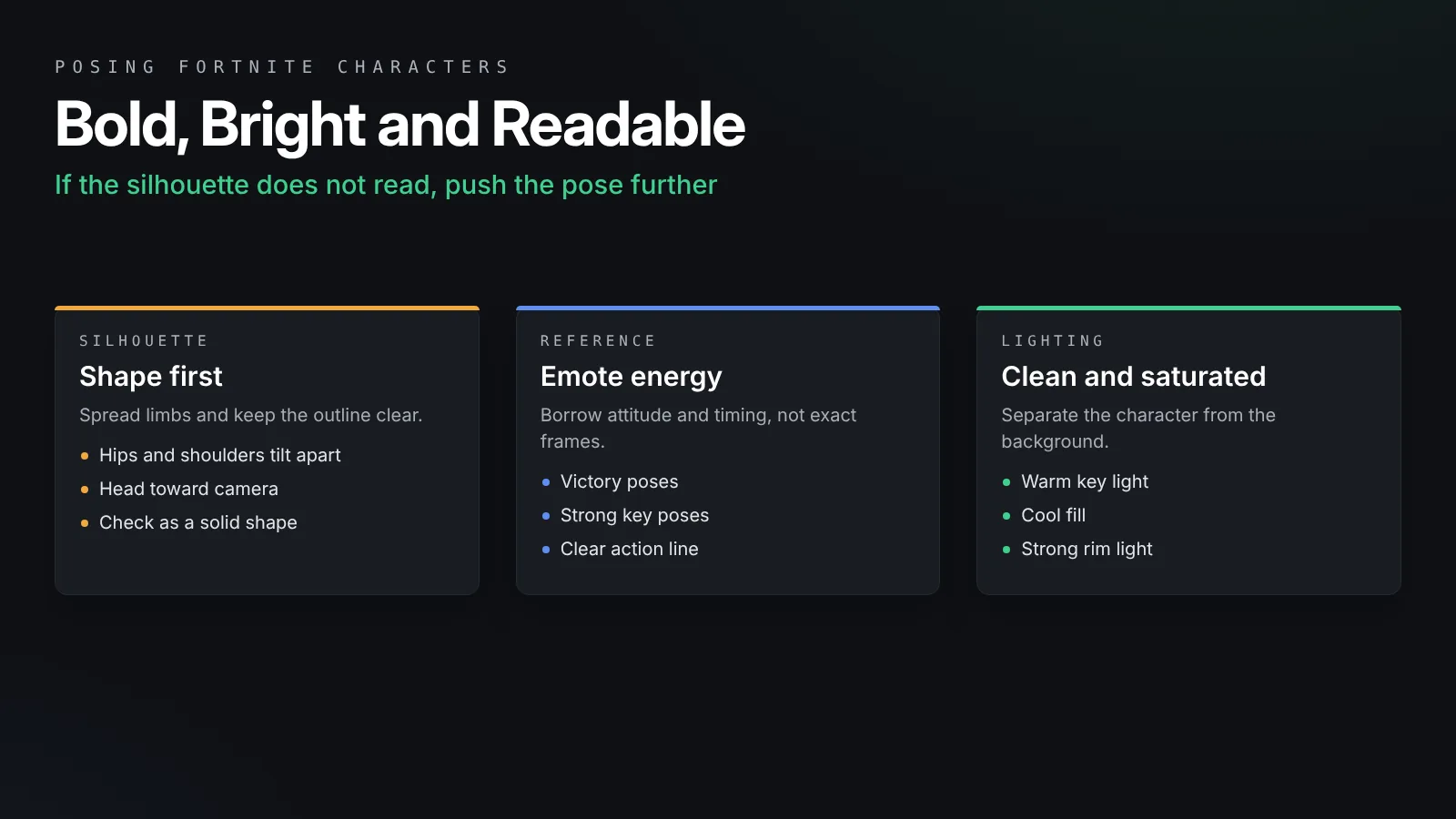
Fortnite poses are bold and readable. Spread the limbs, tilt the hips and shoulders in opposite directions and turn the head toward the camera. Check the pose as a solid shape. If you cannot tell what the character is doing from the outline, push it further.
Use emotes as reference
Fortnite’s emotes and victory poses are full of strong key poses. Study them for timing and attitude, then build your own version. Copying an exact pose frame for frame is less interesting than borrowing its energy.
Match the lighting style
Fortnite uses bright, clean lighting with saturated colors. A warm key light, a cooler fill and a strong rim light separate the character from the background. Keep shadows soft, and avoid heavy fog unless the scene calls for it.
Props and accessories
Pickaxes, gliders and back blings add story to a scene. If they come as separate models, attach them to a hand bone with a rig constraint or by parenting them in the Animation Set Editor, so they follow the hand through the whole shot.
Common Problems With Fortnite Ports
Most problems repeat from port to port.
| Problem | Likely cause | Fix |
|---|---|---|
| Model missing from the browser | SFM was open during the download or files in the wrong folder | Restart SFM and check the usermod structure |
| Purple and black textures | Material path does not match | Check $cdmaterials and the VMT locations |
| rig_biped_simple fails | Unreal bone names | Use the port’s rig script or pose with FK |
| Model is huge or tiny | Scale not converted from Unreal | Rescale in Blender and recompile |
| Face does not move | No flexes or face bones in the port | Use a port with face controls or animate the head only |
| Skin looks flat and plastic | No normal map or phong in the VMT | Add $bumpmap and phong settings |
Frequently Asked Questions
Are Fortnite SFM models official?
No. Epic Games does not release Fortnite models for Source Filmmaker. Every Fortnite SFM model is a fan port made by community members, so quality, features and rights notes vary from one port to another.
Is it legal to use Fortnite models in SFM?
Fortnite characters belong to Epic Games. Personal, non-commercial fan art is common, but you should follow Epic’s fan content rules and each porter’s terms, credit the creators and never sell renders or redistribute ports as your own.
Why does rig_biped_simple not work on my Fortnite model?
The script looks for Valve biped bone names. Fortnite ports usually keep Unreal names such as pelvis and spine_01, so the script cannot find the bones. Use a rig script made for that port, pose with FK, or rename bones before compiling.
Where do I put a downloaded Fortnite model for SFM?
Copy its models and materials folders into SourceFilmmaker\game\usermod, keeping the folder structure. Then fully restart SFM and search for the character in the model browser.
Why is my ported Fortnite model the wrong size?
Unreal measures in centimeters while Source units are close to inches. Scale the model in Blender so it stands about 72 units tall, apply the scale and compile it again.
Can I change a Fortnite character’s style in SFM?
If the porter added styles as skins or bodygroups, yes. Open the model in the Element Viewer and change the skin and body values. If the styles are separate models, load the version you want from the model browser.
Final Thoughts
Start with a good port
Fortnite SFM models are fan ports, so your experience depends on choosing a well made one. Use the Steam Workshop or a trusted model hub, import it into usermod, and check its rig and face controls before you start. If you port a character yourself, fix the scale, trim the skeleton and rebuild the materials for Source. Then pose with bold silhouettes and bright lighting, keep your work non-commercial and credit the people who made it possible.