
Quick Answer
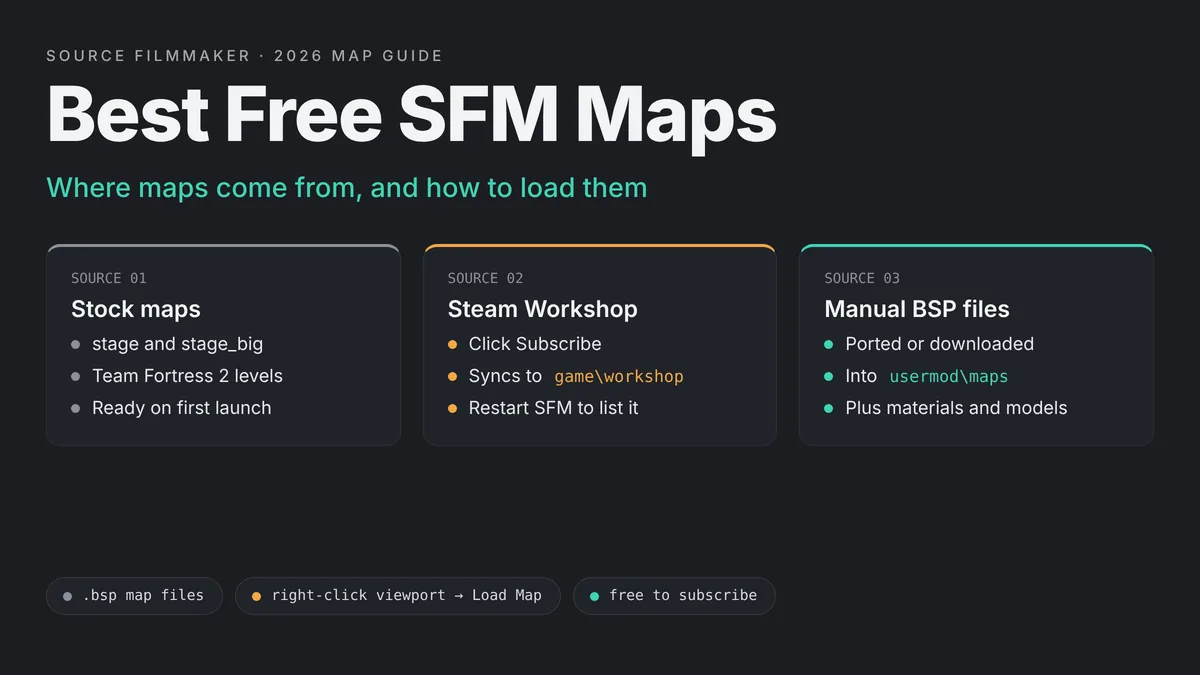
Free SFM maps come from three places. Source Filmmaker ships with stock maps, the Steam Workshop holds thousands of community sets, and fans port levels from other Source games as BSP files you copy into usermod maps. Subscribe or copy the file, restart SFM, then right-click the viewport, choose Load Map and filter by the map name.
This guide covers where maps come from, a curated list of well-known free maps you can check on the Workshop today, and how to load, install and fix them. Every map below is live on the SFM Workshop under the exact title shown, so you can search for it and read the author’s notes before you subscribe.
Pick a map
Start with a stock map like stage, or subscribe to a free map on the SFM Workshop.
Install it
Workshop maps sync on their own. Manual BSP files go in game\usermod\maps.
Restart SFM
New maps only appear in the list after SFM scans its folders at startup.
Load Map
Right-click the viewport, choose Load Map, select the map and click Open.
Where SFM Maps Come From
SFM maps are Source engine levels saved as .bsp files. SFM reads them from mod folders inside SourceFilmmaker\game. There are four main places your maps will come from, and each one installs a little differently.
Stock Maps That Ship With SFM
Valve’s Steam page says SFM includes all the base game assets from Team Fortress 2. That is why the Load Map list already holds TF2 levels the moment you install the tool. You also get simple studio maps. Community answers on the SFM forums point new users to stage, a medium white room with a grid and an orange pad in the middle, and stage_big, a larger version of the same room with weaker lighting.
Stock maps never go missing and never need extra content. That makes them the best place to test a model or a rig before you move to a busy custom set.
Steam Workshop Maps
The SFM Workshop is the biggest free source. You can filter it by the Map tag and sort by most subscribed or most recent. Valve’s wiki explains that subscribed items download into the workshop mod, next to the default usermod mod. Each item page usually lists the exact .bsp file names under “Includes”, which tells you what to type in the Load Map filter.
Ported Maps From Other Games
Many popular maps started life in another Source game, such as Garry’s Mod or Counter-Strike: Source. Valve’s SFM help page says that if you want maps beyond those that come with SFM, including maps from Team Fortress 2 or any other Source game, you should recompile them first. In practice, most people grab a port someone has already made and uploaded. The reverse is also true. The author of SFM_SUBURBIA notes that it was compiled with the SFM version of Hammer and will not work in Garry’s Mod.
Maps You Build Yourself
SFM comes with Valve’s SDK tools, including the Hammer map editor. Right-click Source Filmmaker in your Steam library and choose Launch SDK to open it. Building a map is a bigger project than this guide covers, but it is the only way to get a set that matches your story exactly. Our step by step guide on how to make a custom SFM map with Hammer walks you through your first build.
Best Free SFM Maps to Try
The maps below are all free on the Source Filmmaker Workshop, and each one was checked on its live Workshop page. We grouped them by the kind of shot they suit. Download sizes come from the Workshop pages and help you plan disk space. Always read the description first, because some authors list extra content you need.
stage and stage_big (Built In)
These are the plain studio rooms that come with SFM. Type stage in the Load Map filter to find both. They suit taunts, character tests, poses and turnarounds. The even lighting shows a model clearly, so you can spot broken textures or bad weights fast.
Green Screen Rooms (Colorable)
Green Screen Rooms (Colorable) by Ninja Cookie is a small download, about 1.1 MB, built for posters and film work where you key out the background later. The author gives one important tip: right-click the primary viewport, open Draw Game Entities and turn on Other Entities, or the screens will not show. If you want a simpler option, Green Screen Room by Fox is a single map called greenscreen_room.bsp.
White Rooms
White Rooms by NumeriChunk packs five rooms into one map, nc_whiterooms.bsp. Three are indoor rooms and two are outdoor spaces. Clean white sets are useful for product style shots, music videos and dreamlike scenes, because your own lights shape the mood.
SKYBOX-MAPS [with floor]
SKYBOX-MAPS [with floor] by Mac includes two maps, one for day and one for night. Each is a flat floor under an open sky. The author notes you can swap the sky with the sv_skyname console command, which makes this a handy base for outdoor portraits.
The Theater
The Theater by Auld is a small theater with rows of seats, a stage, a projection room and a lobby. The author made it sparse and dark on purpose, so you can dress it yourself. It fits stand-up scenes, band shots and anything set in front of an audience.
SFM_SUBURBIA
SFM_SUBURBIA by Benjamoose is a Team Fortress 2 themed neighborhood. It is a larger download at about 180 MB. The usage terms are clear: you may use it for machinima at your own discretion, a credit is appreciated, and a contributor credit is required if you enter it into a Saxxy contest.
sfm_City_Central
sfm_City_Central by Ayanokoji is a small realistic city with surrounding buildings, working traffic lights and street decals. The author links a separate non-lit version and says the map needs Counter-Strike: Source and Half-Life 2: Episode Two content. If you see missing textures, that note is the first place to look.
Western Town and TF2 Campsite
sedisocks made two TF2 styled maps that still sit near the top of the Workshop. Western Town Map includes a saloon and a jail with interiors, in day and night versions. TF2 Campsite Map is a campsite with sfm_campsite_day.bsp and sfm_campsite_night.bsp. Both are light downloads and work well for comedy shorts.
Lost Forest Map
Lost Forest Map by theFaceless is a dense forest set with a dim version and a daytime version. It is one of the heavier maps on this list at about 208 MB. The author says all needed resources are now included, so you no longer need to subscribe to a separate collection.
Swanky Desert Road and Swanky Forest Road
Zatemedek built Swanky desert road as a simple road map with machinima in mind, with day and night versions. A matching forest road version is also on the Workshop. The author’s notes are useful: mount Team Fortress 2 content if textures are missing, and you may need to rebuild cubemaps.
SFM Space
SFM Space by Lazyneer gives you sfm_space.bsp and a darker sfm_space_dark.bsp. Space backdrops are popular for sci-fi intros, title cards and floating character poses.
gm_construct and gm_bigcity Ports
If you know Garry’s Mod, these will look familiar. gm_construct and gm_bigcity Port were both uploaded by deckenid. The bigcity page states plainly that it is a port and credits Bigwig as the original creator. A large open city like this suits chase scenes and wide establishing shots.
TF2 Apartment Building
TF2 Apartment Building by KOT is a public build of a set the author used in their own videos. Most props were removed so you can redecorate it. The author suggests sticking to the camera angles shown in the screenshots, since not every room is fully finished.
Fan Maps From Other Games
Fan recreations of game locations are some of the most subscribed maps on the SFM Workshop, with horror game sets near the top of the list. These are made by fans, not by the original studios. Check each page for missing content notes, and respect any credit rules the author sets.
Free SFM Maps Compared
This table sums up the maps above. Sizes are rounded from each Workshop page and may change when an author updates a map.
| Map | Type | Size | Versions | Best for |
|---|---|---|---|---|
| stage, stage_big | Studio room | Built in | One each | Model tests, taunts, poses |
| Green Screen Rooms (Colorable) | Green screen | About 1.1 MB | Several rooms | Posters, keyed footage |
| White Rooms | Studio set | About 35 MB | Five rooms | Clean, stylized shots |
| SKYBOX-MAPS | Open sky | About 3.9 MB | Day and night | Outdoor portraits |
| The Theater | Interior | About 1.7 MB | One | Stage and audience scenes |
| SFM_SUBURBIA | Neighborhood | About 180 MB | One | TF2 style stories |
| sfm_City_Central | City | About 137 MB | Lit and non-lit | Realistic street scenes |
| Western Town Map | Town | About 40 MB | Day and night | Westerns, comedy |
| Lost Forest Map | Forest | About 208 MB | Dim and daytime | Horror, fantasy |
| SFM Space | Space | About 52 MB | Normal and dark | Sci-fi intros |
How to Load a Map in SFM
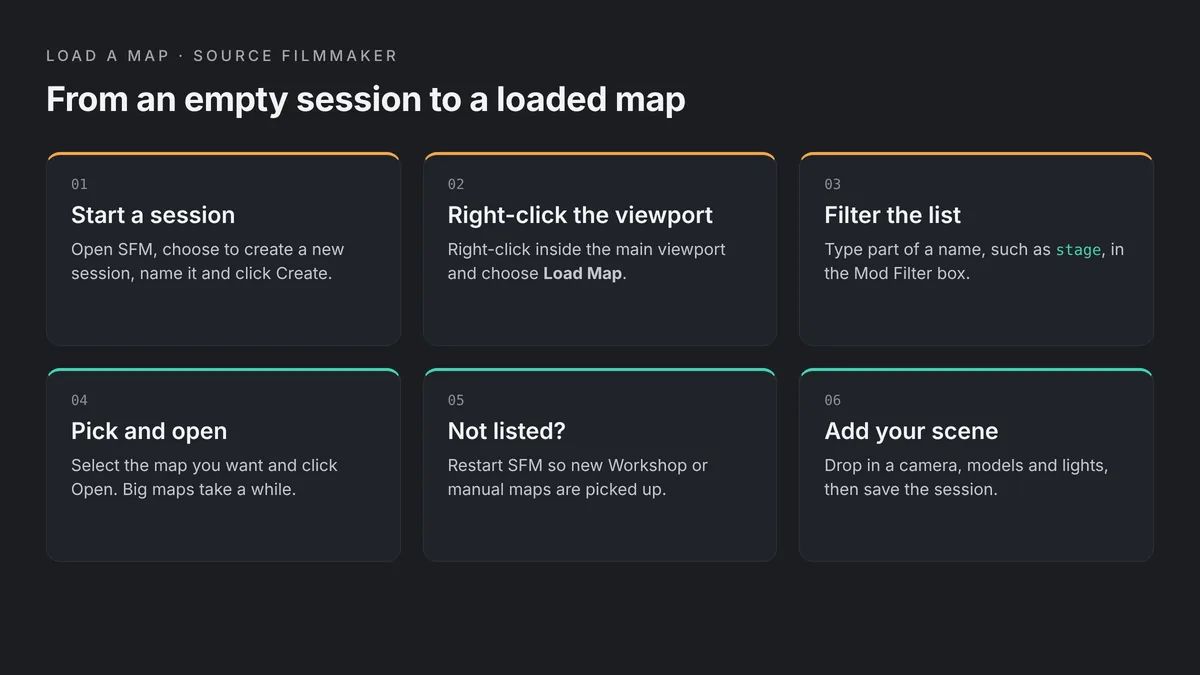
Loading a map takes less than a minute once it is installed. Valve’s guide to starting the SFM describes the core steps, and the list below adds the small details that trip up new users.
Create a session
Open SFM, choose to create a new session, give it a name and folder, and click Create.
Open Load Map
Right-click inside the viewport window, then click Load Map.
Filter the list
Type part of the map name in the Mod Filter box at the top to shorten the list.
Open the map
Select the map you want and click Open. Large maps can take a while.
Check the view
Fly around the set and look for purple textures or red ERROR props before you build a shot.
Save the session
Save right away, so the map loads automatically the next time you open the session.
Use the BSP Name, Not the Workshop Title
The Load Map list shows file names, not the titles you saw on the Workshop. Western Town Map, for example, appears as western_day and Western_night. Copy the names from the “Includes” line on the Workshop page and paste part of one into the filter.
When the Map List Is Empty
If the list shows no maps at all, first check that the filter box is empty, including stray spaces. One community fix on the SFM forums is to close SFM, delete ingamedialogconfig.vdf from SourceFilmmaker\game\platform\config, and restart. That file only stores dialog settings, but back it up before you delete it.
How to Install Steam Workshop Maps
Workshop maps are the easiest to install, since Steam does the copying for you. Valve’s page on subscribing to Workshop items covers the basics. Our full guide to importing SFM models from the Steam Workshop goes deeper on folders and search paths.
Subscribe From the Workshop
Open the Source Filmmaker Workshop in Steam, filter by the Map tag, and open an item. Click Subscribe. If SFM is not running, Valve’s wiki says it will ask about the new item the next time you start SFM. If it is running, restart it anyway so the map shows up in the Load Map list.
Where Workshop Maps Are Stored
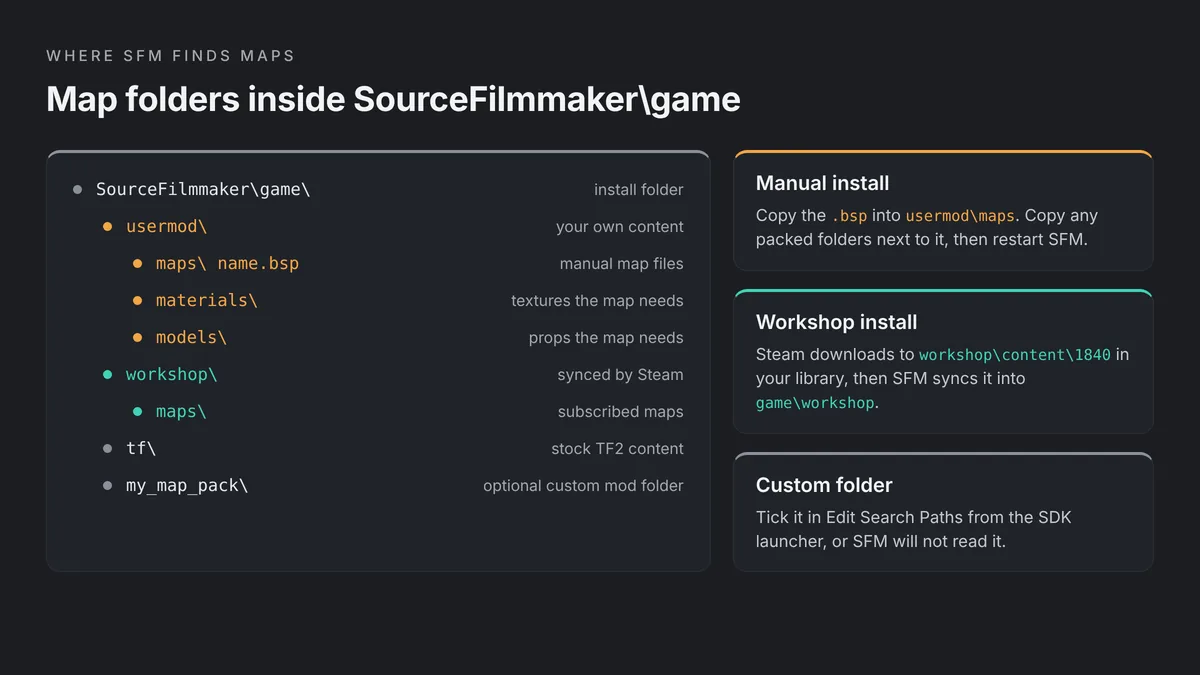
Steam first downloads Workshop files to steamapps\workshop\content\1840 in your Steam library. SFM then syncs them into SourceFilmmaker\game\workshop, which is the folder it actually reads. Maps end up in the maps folder there, next to any materials or models they ship with.
Unsubscribe to Clean Up
Big maps take real disk space. When you finish a project, unsubscribe from the maps you no longer need. Keep a note of which maps each saved session uses, because a session will not open its set properly once the map is gone.
How to Install BSP Files Manually
Some maps are only shared as a zip download, often as a backup link in the Workshop description. Lost Forest Map and Western Town Map both offer manual downloads. Installing these by hand is simple once you know where each folder goes.
Put the BSP in usermod\maps
Open SourceFilmmaker\game\usermod. If there is no maps folder inside it, create one. Copy the .bsp file into usermod\maps, then restart SFM. The usermod folder is enabled by default, which makes it the quickest place to test a new map.
Copy Materials, Models and Sounds Too
Many map downloads include folders named materials, models or sound. Copy those folders into usermod as well, so they merge with the folders already there. If you skip this step, the map loads but its custom textures and props will be missing.
Use a Separate Folder for Big Packs
Community users often advise against dumping everything into usermod. A separate folder per map pack is easier to switch off later. Make a new folder inside SourceFilmmaker\game, copy the map’s files into it, then right-click Source Filmmaker in Steam, choose Launch SDK, and tick that folder in Edit Search Paths for Selected Mod.
Fixing Missing Textures and Props on Maps
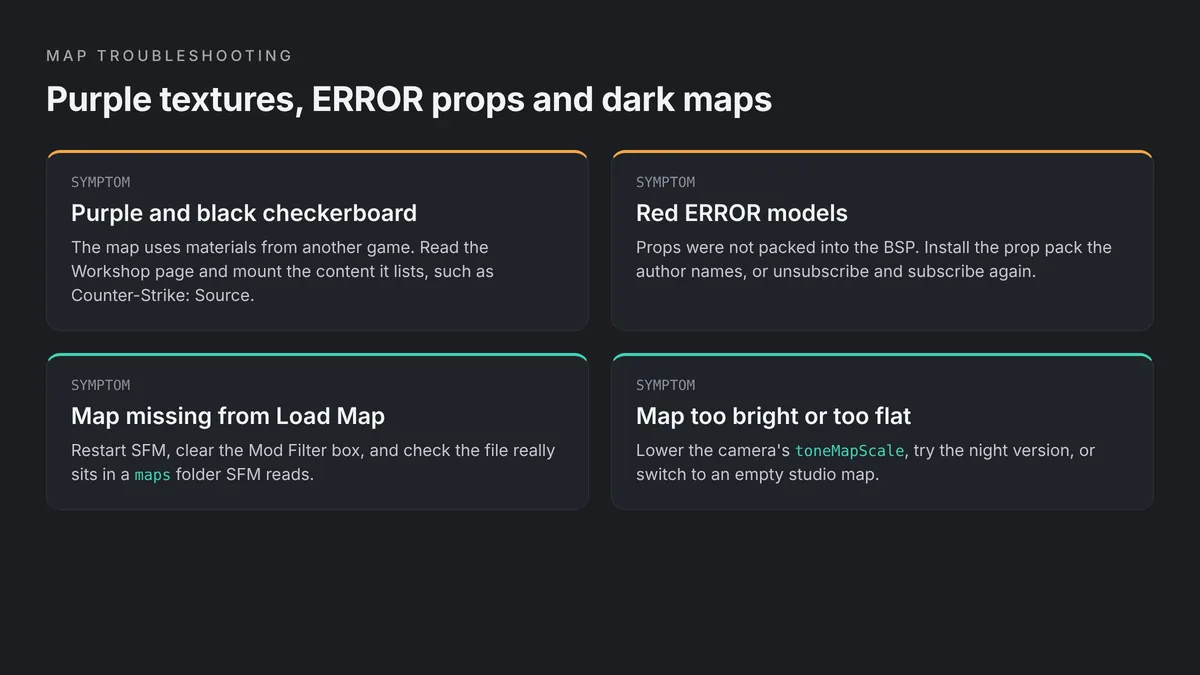
A map can load fine and still look broken. Purple and black checkerboards mean a missing material. Red ERROR shapes mean a missing model. Our SFM missing textures fix explains how SFM searches for materials, and the SFM red ERROR model fix covers broken props in detail. The map specific causes are below.
Mount the Game the Map Needs
Maps built from other games often depend on content that was never packed into the BSP. The sfm_City_Central author lists Counter-Strike: Source and Half-Life 2: Episode Two content as a requirement, for example. The usual community method is to copy the needed game content into its own folder inside SourceFilmmaker\game, enable it in Edit Search Paths, and restart SFM.
Resubscribe to Fix Broken Downloads
The author of The Theater gives simple advice for NODRAW textures and red ERRORs: unsubscribe and subscribe again. If SFM asks, let the map’s files replace older ones. If that fails, unsubscribe from other Workshop maps that might share file names and conflict with it.
Turn On Hidden Entities
Some maps place screens, signs or effects as game entities that SFM hides by default. The Green Screen Rooms author explains the fix: right-click the primary viewport, open Draw Game Entities and enable Other Entities. Try this before you assume a part of the map is missing.
Rebuild Cubemaps With Care
Shiny surfaces that reflect the wrong colors usually point to old cubemaps. The Swanky road author warns you may need to rebuild them. Valve’s wiki says the buildcubemaps command saves the result into the BSP in the maps folder, so keep a backup copy of the original file before you try it.
Lighting Tips for SFM Maps
The map sets your starting light. When you open a map, SFM uses the level’s own baked lighting first, and your lights are added on top. Our SFM lighting guide covers shadows and volumetrics. These tips are specific to working with maps.
Tame Baked Lighting With toneMapScale
You cannot dim a map’s baked lighting directly. Instead, select the camera and lower its toneMapScale until the map reads as a dim base. Then let your key light do the work. This keeps attention on your characters instead of a flat, bright set.
Choose the Right Version of the Map
Many authors ship more than one lighting setup. Western Town, TF2 Campsite, Swanky road and SKYBOX-MAPS all offer day and night versions. SFM Space has a dark version, and sfm_City_Central has a non-lit version. Picking the right version saves you from fighting the lighting later.
Change the Sky for Outdoor Shots
On maps with a visible sky, the sv_skyname console command swaps the skybox. The SKYBOX-MAPS author gives sv_skyname sky_night_01 as an example. Match the sky to your light direction, so shadows and background tell the same story.
Use Empty Rooms for Full Control
For product shots or stylized looks, start in a bare room like stage, White Rooms or a green screen map. With little baked light to fight, three lights are often enough. Our guide to SFM camera tips helps you frame these simple sets so they look cinematic.
Map Performance Tips
Large maps are one of the most common reasons SFM feels slow. A city or forest set loads far more geometry and textures than a studio room, and that weight stays with you through every shot.
Check the Size Before You Subscribe
The Workshop page shows each map’s file size. A 208 MB forest will load and play back slower than a 2 MB theater. If your PC struggles, block out the shot on a small map first, then move to the heavy set for the final version.
Trim Your Search Paths
Every extra mod folder adds work when SFM starts and searches for files. Untick folders you do not need in Edit Search Paths for the current project. Our SFM lag fix guide covers this and other speed settings in more detail.
Test on a Stock Map
If SFM lags on a custom map, load stage with one character and compare. If stage runs smoothly, the map is the problem, not your PC. You can then pick a lighter map or frame your shots so the camera sees less of the set.
What About Maps in Source 2 Filmmaker?
Source 2 Filmmaker works with Source 2 maps, which are built from VMAP files rather than Source 1 BSP files. That means your SFM map library does not carry over directly. S2FM runs inside a game’s Workshop Tools, such as Half-Life: Alyx, and works with that game’s Source 2 maps. Read our Source 2 Filmmaker guide to see what changed and when switching makes sense. New to the original tool? Start with our guide to installing Source Filmmaker on Windows.
Frequently Asked Questions
Are SFM Workshop maps free?
Yes. Source Filmmaker is free on Steam, and items on its Workshop are free to subscribe to. Some authors still set usage terms. SFM_SUBURBIA, for example, asks for a contributor credit if you use it in a Saxxy entry. Read each description before you publish a film, and credit the map author whenever they ask for it.
Where do I put BSP files for SFM?
Copy the .bsp file into SourceFilmmaker\game\usermod\maps, creating the maps folder if needed. Copy any materials, models or sound folders from the download into usermod too. Then restart SFM, right-click the viewport, choose Load Map and filter by the file name. For big packs, a separate folder enabled in Edit Search Paths is tidier.
Why is my new map not in the Load Map list?
SFM scans its folders when it starts, so restart it after you subscribe or copy a map. Clear the Mod Filter box, including any spaces. Then check that the .bsp file sits inside a maps folder that SFM reads, such as usermod\maps or workshop\maps. A custom folder must also be ticked in Edit Search Paths.
Why does my SFM map have purple checkerboard textures?
The map uses materials that SFM cannot find. Many ported maps need content from another game, such as Counter-Strike: Source or Half-Life 2: Episode Two. Read the Workshop description for requirements, mount that content in its own folder, and enable it in Edit Search Paths. Resubscribing can also fix a broken or incomplete download.
Can I use Garry’s Mod or CS:GO maps in SFM?
Not always directly. Valve’s SFM help page says maps from other Source games should be recompiled first. The easier route is to find a port that someone has already made for SFM, such as the gm_construct and gm_bigcity ports on the Workshop. Maps compiled for SFM may not work in Garry’s Mod either.
How do I make a bright SFM map darker?
Select the camera and lower its toneMapScale until the baked map lighting fades to a dim base, then light your subject with your own lights. Many Workshop maps also include a night, dim or dark version, so check the Includes list. Empty studio maps like stage give you the most control over lighting.
Can I make my own map for SFM?
Yes. SFM includes Valve’s SDK tools, among them the Hammer map editor. Right-click Source Filmmaker in your Steam library and choose Launch SDK to open them. Building a full map takes time to learn, so many creators start with one small room and simple lighting before they try a full level.