
Quick Answer
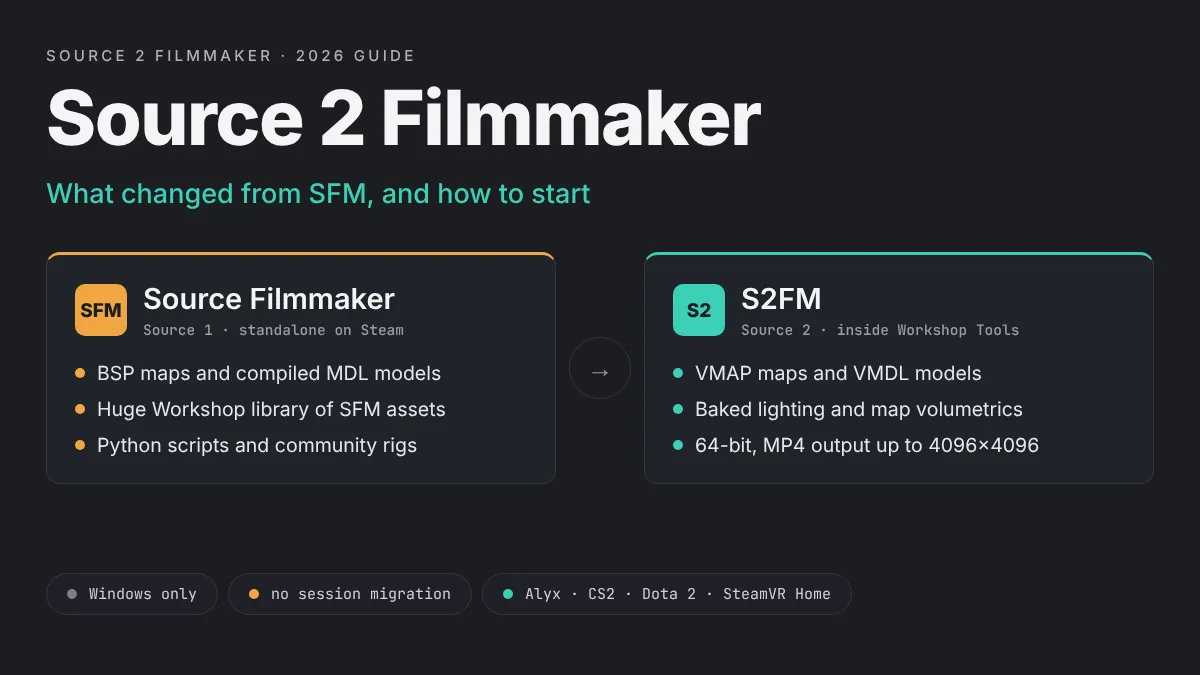
Source 2 Filmmaker, or S2FM, is Valve’s newer movie tool for the Source 2 engine and the successor to Source Filmmaker. It is not a separate download. It is built into the Workshop Tools of games such as Half-Life: Alyx, Counter-Strike 2, Dota 2 and SteamVR Home, and it adds faster loading, 64-bit memory and direct MP4 output.
S2FM brings faster loading, 64-bit memory, direct MP4 output and a modern content pipeline. It also asks you to learn new file types and a new way of lighting scenes. This guide explains what changed, how to install and launch it, and when it makes sense to switch from SFM.
Pick a game
Install Half-Life: Alyx, Counter-Strike 2 or Dota 2, the games that ship S2FM in their tools.
Add the Workshop Tools
Install the Workshop Tools DLC from the game’s DLC tab in Steam.
Create an addon
Launch the tools and create a new addon to hold your sessions and assets.
Open S2FM
Click the Source Filmmaker icon in the Asset Browser and start a session.
What Source 2 Filmmaker Is
Valve’s Source 2 Filmmaker page describes it as a tool for creating flexible, modifiable 3D recordings that you can export as a movie or a still image. In practice, it keeps the SFM layout you may already know: a viewport, an animation set editor, a timeline and the Motion Editor and Graph Editor.
Under the hood, almost everything else is new. S2FM reads Source 2 maps, models and materials. It runs inside the same toolset as Hammer, the Material Editor and ModelDoc. That means it is part of a bigger production pipeline rather than a stand-alone program.
A Short History of S2FM
The first public version arrived much earlier than many people think. Valve’s wiki lists September 9, 2015 as the public release, when Dota 2 moved to Source 2 with Dota 2 Reborn. For several years, Dota 2 was the main place to use it.
The tool reached a much wider audience on May 15, 2020. That day, Valve released the Half-Life: Alyx Workshop Tools as a beta. The release included Hammer, the Material Editor, ModelDoc, AnimGraph, the Particle Editor and Source Filmmaker for Source 2. Many creators first heard the name Source 2 Filmmaker at that point, because Alyx gave them high quality characters and environments to work with.
Today, Valve’s wiki lists four ways to get S2FM: the Workshop Tools for Half-Life: Alyx, Counter-Strike 2 and Dota 2, plus the SteamVR Home workshop tools.
Will Valve Release a Standalone S2FM?
Valve’s own S2FM FAQ answers this directly. It says the Source 2 Filmmaker will stay in all Source 2 games, next to tools like Hammer and the Particle Editor. There are no plans to ship it as a separate app. So the original SFM on Steam is not being replaced, and S2FM is not coming to the Steam store as its own download.
How You Access S2FM
You open S2FM through a game’s Workshop Tools. Each version uses the content of the game it ships with. Alyx tools give you Alyx characters, props and maps. CS2 tools give you CS2 content. You cannot freely mix them, because each toolset loads only its own game’s files plus your addon.
| Game | Cost of the tools | How to open S2FM |
|---|---|---|
| Half-Life: Alyx | Free DLC, game must be owned | Workshop Tools, then the Source Filmmaker icon |
| Counter-Strike 2 | Free | CS2 Workshop Tools DLC, then the SFM button in the Asset Browser |
| Dota 2 | Free | Dota 2 Workshop Tools DLC, empty addon, then the SFM button |
| SteamVR Home | Free | SteamVR Home workshop tools from SteamVR settings |
Most SFM users start with Half-Life: Alyx. Its characters and maps suit cinematic work, and the community has written the most S2FM guides for it. The rest of this guide uses Alyx as the main example. The steps for CS2 and Dota 2 are very similar.
Key Differences Between SFM and S2FM
If you know SFM, the interface will feel familiar for about five minutes. After that, you will notice how much has changed. These are the differences that matter most.
Renderer and Output
S2FM still uses progressive refinement. The viewport shows a fast interactive view, then refines the still frame with more samples for depth of field and antialiasing. Valve says this refinement is faster in Source 2, and volumetric lights look better before refinement even starts. You can switch between the interactive and refined views instantly.
Output also improved. S2FM can render straight to MP4 files with H.264 video and AAC audio, so you may not need the FFmpeg step many SFM users rely on. Movie output can go up to 4096×4096. One exception: Valve’s notes say the CS2 version only exports audio and image sequences, with no video format. If you still render frames, our guide on how to render SFM to MP4 shows how to join an image sequence into a video.
Lighting Works Differently
Lighting is the biggest mental shift. In SFM, you often load a map, turn off its lights and build your own three-point setup. Valve’s Source 2 Filmmaker Theory page explains that Source 2 relies on baked lighting, which Valve chose for VR performance in Half-Life: Alyx. Volumetric lighting is also defined by the map now, not set on each light.
Lights you add from the animation set panel still work, but Valve’s wiki warns that almost all of the game’s rendering techniques are incompatible with them. The wiki recommends using the map’s own lights where you can. A common trick is to load the map, press Record for a few seconds, and then turn off the map’s live lights. The recorded lights become part of your session, and you can then animate them. Our SFM lighting guide covers the classic SFM approach if you want to compare.
Maps: VMAP Instead of BSP
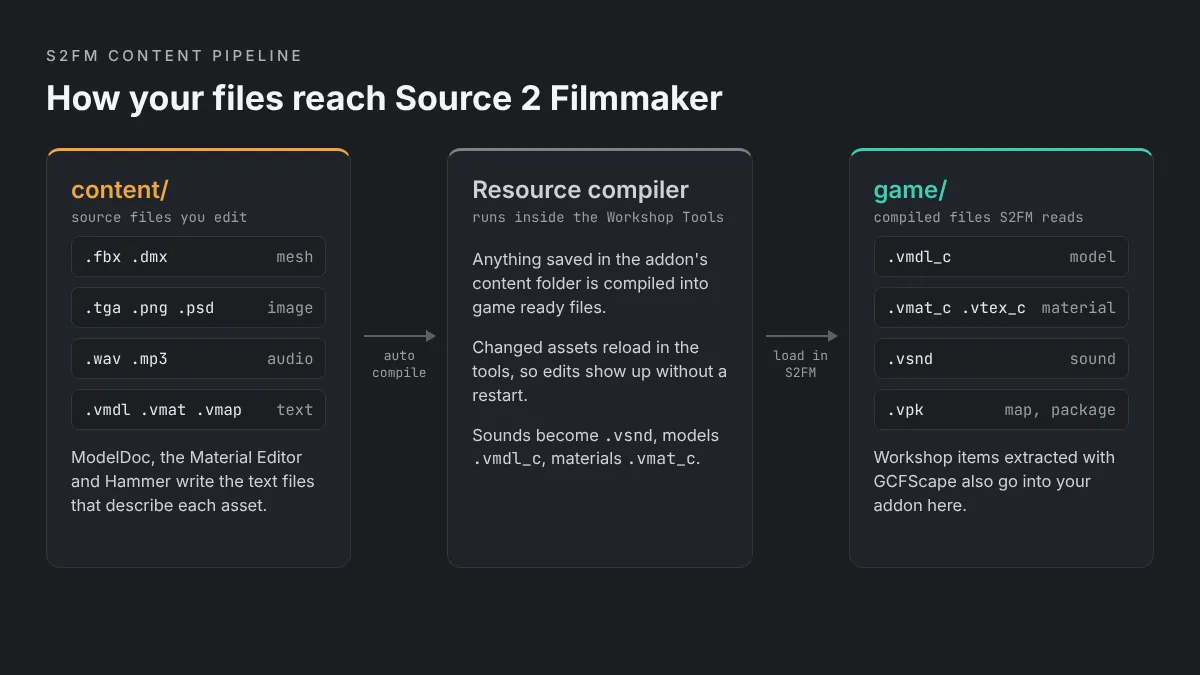
SFM loads compiled BSP maps. Source 2 uses VMAP files from Source 2 Hammer. Valve’s wiki explains that Source 2 stores level geometry as half-edge meshes, not brushes, and splits the compiled data into separate files instead of one BSP. A compiled map becomes a vmap_c file with its physics, visibility and entity data stored next to it.
This matters for filmmakers for two reasons. Maps load much faster, so each shot in S2FM can use a different map, and you can scrub between them quickly. A shot can even have no map at all, with a plain background color or an image. Valve also suggests learning Hammer for scene building, since Hammer can import models as world geometry and edit them with its mesh tools.
Models: VMDL and the Content Folder
In SFM, a model is a compiled MDL file built from a QC script. In Source 2, the matching files are VMDL and vmdl_c. Valve’s wiki compares the VMDL text file to a QC and the compiled vmdl_c file to an MDL. You build and edit VMDL files in ModelDoc.
Every addon has two folders. The content folder holds source files such as FBX or DMX meshes, TGA, PNG or PSD textures, and text files like vmdl, vmat and vmap. The game folder holds the compiled versions that S2FM reads. Anything you save in content is compiled for you, and S2FM reloads changed assets on the fly. That is a big change from SFM, where you compile models by hand with studiomdl.
Rigging, Controls and Scripting
Valve rebuilt several animation tools. Constraints can now be added or removed one at a time. IK can be applied to any bone that has a parent and a grandparent, and a new spline constraint works on any bone chain. The game camera moves with WASD while you hold the right mouse button, and you no longer need to hold Ctrl to select transform controls.
Scripting is less certain. Valve’s notes list Python scripting as missing in the Dota 2 version, along with SFM workshop integration. Do not assume your old SFM Python scripts, such as community rig scripts, will run in S2FM. Test them before you plan a project around them. Our SFM rigging guide explains what those scripts do in the original tool.
Performance and Memory
S2FM is 64-bit only. Valve’s wiki says this lets it use more than 4 GB of RAM, which allows longer movies and more complex scenes. Load times are faster, and animation is no longer clamped to the clip length. That last change fixes an old bug where animation froze after 60 seconds.
System Requirements
Valve’s wiki lists two hard requirements for S2FM: a 64-bit version of Windows and a 64-bit CPU. The Half-Life: Alyx Workshop Tools are Windows only, so there is no macOS or Linux version. You also need the Workshop Tools DLC for your chosen game.
We could not find separate hardware specs published for the tools. The game’s own Steam listing is the safest baseline. For Half-Life: Alyx, Steam lists these minimum specs:
| Component | Half-Life: Alyx minimum (Steam) |
|---|---|
| Operating system | Windows 10, 64-bit |
| Processor | Core i5-7500 or Ryzen 5 1600 |
| Memory | 12 GB RAM |
| Graphics | GTX 1060 or RX 580 with 6 GB VRAM |
| Tools platform | Windows only |
These are minimums for playing the game. Large S2FM scenes with volumetric lights and high resolution renders will benefit from more RAM and a stronger GPU. You do not need a VR headset to use the tools, because you can turn VR off when you launch them.
How to Install and Launch Source 2 Filmmaker
The steps below use Half-Life: Alyx, based on Valve’s installing and launching tools guide. For CS2 or Dota 2, install that game’s Workshop Tools DLC instead and follow the same pattern.
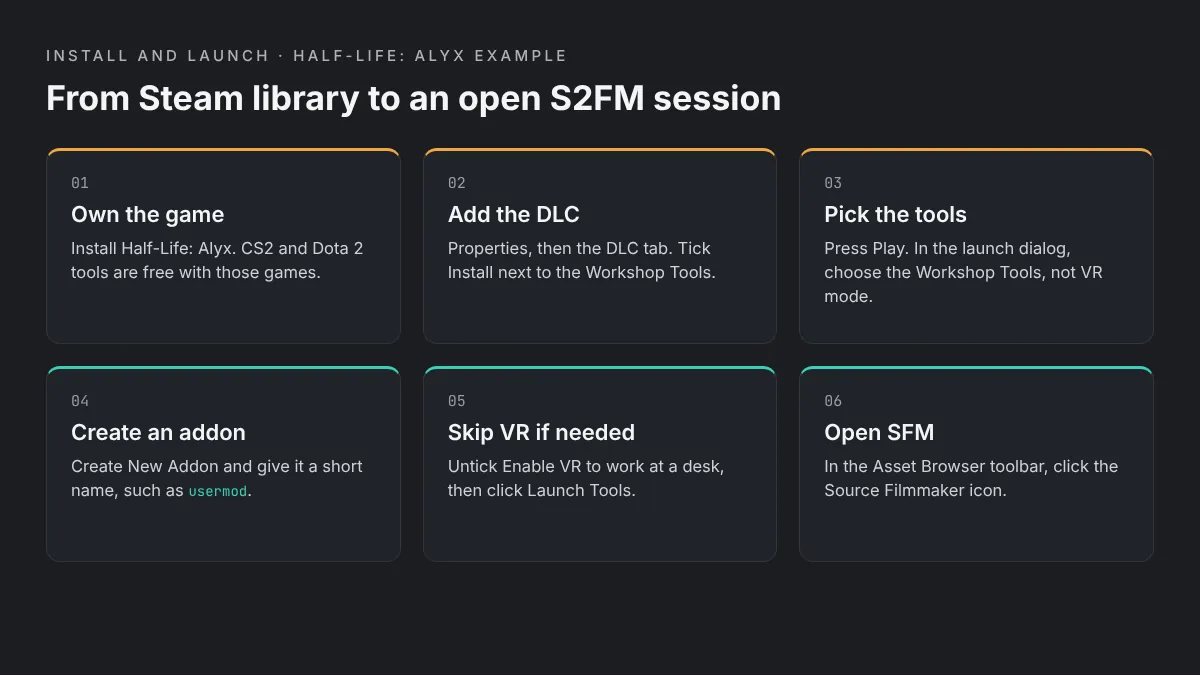
Install Half-Life: Alyx
You need to own the game on Steam. For CS2 or Dota 2, install the free game instead.
Add the Workshop Tools DLC
Right-click the game in your library, choose Properties, open the DLC tab and tick Install next to the Workshop Tools.
Launch the tools
Press Play. When asked to run in VR mode or launch the Workshop Tools, choose the tools.
Create a new addon
Select Create New Addon and use a short, memorable name such as usermod.
Turn off VR if needed
Untick Enable VR to work without a headset, then click Launch Tools.
Open Source Filmmaker
With your addon open, click the Source Filmmaker icon in the Asset Browser toolbar.
If the Workshop Tools do not show up in the DLC tab, restart Steam. Valve notes that a pending update must finish before the DLC appears. If you only want to play other people’s Workshop content, you do not need the tools at all. You can simply subscribe on the Workshop page.
Your addon lives in the game folder under hlvr_addons, for example game/hlvr_addons/usermod inside the Half-Life Alyx install. You can open the content and game folders from the addon’s right-click menu in the tools launcher.
Your First S2FM Project
Once S2FM is open, the layout will look familiar to SFM users. Start small. A single character in one shot is the best way to learn how lights and maps behave in Source 2.
Load a Map
Start a new session, then load a map from the console. For maps that ship with the game, use map map_name. For Workshop or addon maps, Valve’s wiki says to use addon_tools_map map_name, because addon maps will not load with the normal map command.
Capture the Map Lights
If your characters look flat or unlit, the map lights have probably not loaded into your session. Load the map, press Record, capture a few seconds and press Esc. Then turn off Lights under Draw Map Objects. Your session now holds the recorded lights, and you can add an animation set to any light you want to change.
Add a Character and Pose It
Add a model from the model browser and place it in front of your camera. Press Q to switch to selection mode, which hides the transform manipulator. Select a control, then press W, E or R to return to move, rotate or screen mode. Pose the character with the Motion Editor or set keys in the Graph Editor, the same way you would in SFM.
Fix Soft or Missing Shadows
Two settings from Valve’s lighting fixes page help a lot. If the sun does not cast shadows on your characters, untick mixedShadows in the light’s Element Viewer. If shadows look soft or blocky, raise shadowTextureWidth and shadowTextureHeight, for example to 8192.
Render the Shot
Use the refined view to check depth of field and antialiasing, then export. In Alyx and Dota 2, you can render directly to MP4. In CS2, export an image sequence and audio, then join them in a video editor.
Importing Assets Into S2FM
Your old SFM models will not load into S2FM as they are. Source 2 needs its own compiled formats. There are three common ways to get new assets into your addon.
Workshop Items for Half-Life: Alyx
Valve’s wiki describes a manual method for using Alyx Workshop content. Subscribe to the item and note its ID from the Workshop page URL. Then find it in steamapps/workshop/content/546560 under that ID. Open the VPK file with GCFScape and copy the extracted folders, such as models and materials, into your addon’s game folder.
For Workshop maps, copy the VPK itself into your addon folder and load it with addon_tools_map. Community guides suggest doing both: extract the map’s folders and copy the VPK, since some maps break in S2FM otherwise.
Your Own Models
Put FBX or DMX meshes and textures in your addon’s content folder, then build a VMDL in ModelDoc. The tools compile everything for you. Custom sounds work the same way: drop WAV or MP3 files into content, and they compile into vsnd files. If you already build models in Blender for SFM, our Blender to SFM guide covers the export side, which is a useful starting point for Source 2 as well.
Porting Source 1 Content
Valve’s wiki says Source 2 includes pipelines for converting Source 1 content, and the Material Editor, ModelDoc and Hammer can all help. Community scripts also exist for converting Source 1 materials, but their own authors warn they are still rough. Expect to fix materials by hand. Standard SFM imports, like those in our guide to importing SFM models from the Steam Workshop, do not carry over directly.
Limitations and Known Issues
S2FM is powerful, but it is still a set of beta era tools with gaps. Valve’s own wiki lists several limits by game.
Feature Gaps
In the Dota 2 version, phoneme extraction does not work on custom sound files. Shipped sound files already include phoneme data. Some old gestures, such as Shift time preview and Shift drag time selection, were removed on purpose. Only texture overlay and grain or noise effects clips are supported. There is no per-bone scale slider, though you can add a scale property to a bone by hand. If lip sync is central to your work, see our SFM lip sync tutorial for the Source 1 method.
Counter-Strike 2 Issues
The CS2 version has its own quirks. Player models under the character folder are hidden by default, and showing them affects file purity, which blocks play on VAC secured servers. Eyeballs in the CS2 character shader do not render, so characters can look like they lack irises. Lights cannot use light cookies, and projection lights give no light when volumetrics are off.
Crashes and Stability
Valve’s wiki notes that volumetric lights can cause crashes or hangs on some hardware. The page traces one case to a specific first generation Ryzen board paired with a third generation Ryzen CPU. Its workaround is renaming the cs_volumetric_fog.vmat file in the core materials folder. Only try this if you see the same symptoms. As with any SFM tool, save often and keep backup copies of your sessions.
SFM vs S2FM Comparison Table
The table below sums up the main differences between the original Source Filmmaker and Source 2 Filmmaker.
| Feature | Source Filmmaker (SFM) | Source 2 Filmmaker (S2FM) |
|---|---|---|
| Engine | Source 1, Alien Swarm branch | Source 2 |
| How you get it | Free standalone app on Steam | Inside game Workshop Tools only |
| First public release | July 2012 | September 2015 (Dota 2 Reborn) |
| Architecture | Older 32-bit era tool | 64-bit only, can use more than 4 GB RAM |
| Maps | Compiled BSP | VMAP from Source 2 Hammer |
| Models | MDL compiled from QC | vmdl_c compiled from VMDL in ModelDoc |
| Asset compiling | Manual, with studiomdl | Automatic from the content folder |
| Lighting | Add and animate your own lights | Baked map lighting, volumetrics set by the map |
| Video output | Image sequence or AVI | Direct MP4 up to 4096×4096 (not in CS2) |
| Python scripting | Supported | Listed as missing in the Dota 2 version |
| Content library | Huge SFM Workshop catalog | Game content plus extracted Workshop items |
| Best for | TF2 and Source 1 fan animation | Alyx, CS2 and Dota 2 projects |
Should You Switch From SFM to S2FM?
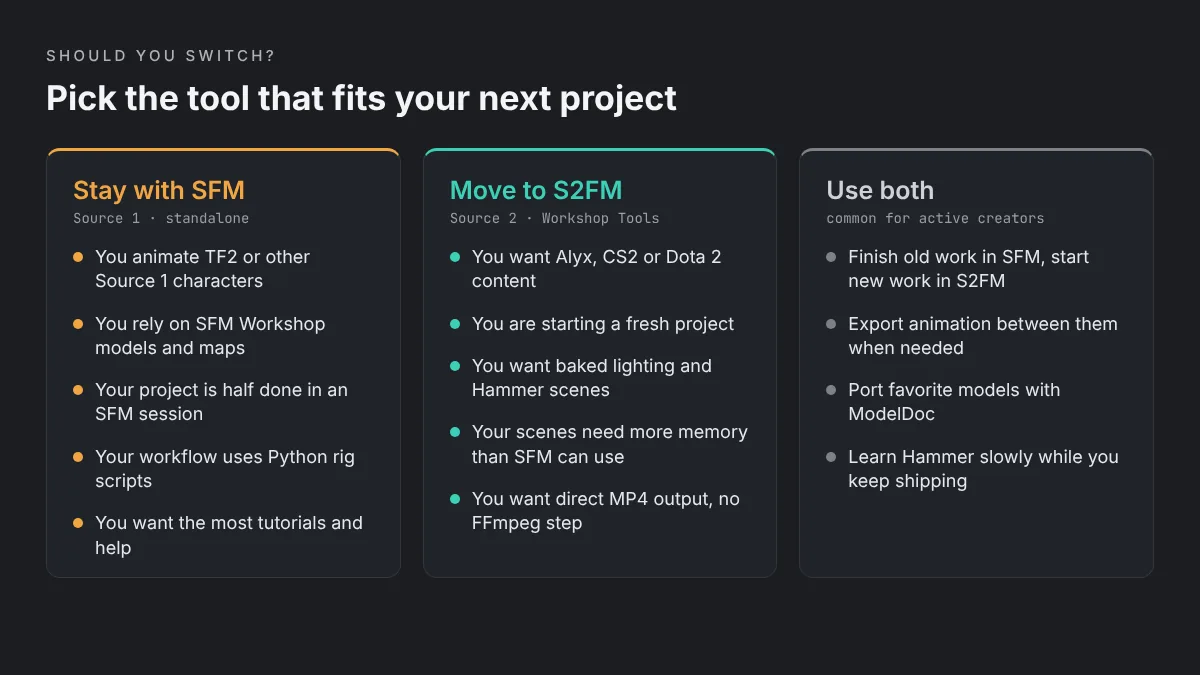
Valve’s FAQ gives a clear rule of thumb. If you are starting a new project in a Source 2 game, S2FM will most likely be easier and faster. For other settings, standalone SFM is probably the better fit. There is also no straightforward way to move a session between the two, though exporting animation between them should still work.
Stay With SFM If
Stay with SFM if you animate Team Fortress 2 or other Source 1 characters, rely on SFM Workshop models, or are partway through a project. SFM also has a far larger library of tutorials and community assets. Our comparison of SFM vs Blender covers where the original tool still shines.
Move to S2FM If
Move to S2FM if you want Half-Life: Alyx, CS2 or Dota 2 content, or you are starting a fresh project and want a modern pipeline. The 64-bit memory, faster map loading and direct MP4 output make long, complex scenes easier. Be ready to learn Hammer and ModelDoc, because they are part of the workflow now.
Many creators do both. They finish existing work in SFM and start new Source 2 projects in S2FM. If you are new to Valve’s tools entirely, our guide on how to install Source Filmmaker on Windows is the easier first step.
Source 2 Filmmaker FAQs
What is Source 2 Filmmaker?
Source 2 Filmmaker, or S2FM, is Valve’s successor to Source Filmmaker. It runs on the Source 2 engine and creates 3D recordings you can export as a movie or still image. It is built into the Workshop Tools of Half-Life: Alyx, Counter-Strike 2, Dota 2 and SteamVR Home, rather than sold as a separate download.
Is Source 2 Filmmaker free?
The tool itself costs nothing, but you need a game that includes it. The Counter-Strike 2 and Dota 2 Workshop Tools are free, because both games are free to play. The SteamVR Home tools are free too. The Half-Life: Alyx Workshop Tools are a free DLC, but you must own Half-Life: Alyx first.
Can I open my SFM sessions in S2FM?
No, not directly. Valve’s S2FM FAQ says there is no straightforward path for migrating sessions between the two versions, because the engines and asset types differ. Exporting animation between them should still work, so you can rebuild a scene in S2FM and bring the motion across.
Do I need a VR headset to use S2FM?
No. In the Half-Life: Alyx Workshop Tools launcher, you can untick Enable VR before you click Launch Tools. That lets you build and animate scenes on a normal desktop. You can change the setting each time you launch the tools.
Does S2FM run on Mac or Linux?
No. Valve’s wiki says the Half-Life: Alyx Workshop Tools are only available on Windows, and S2FM needs a 64-bit version of Windows with a 64-bit CPU. Mac and Linux users would need a Windows PC to use it, since Valve offers no native version for either platform.
Can S2FM render straight to MP4?
Yes, in most versions. Valve lists direct rendering to MP4 files with H.264 video and AAC audio as a new feature, with output up to 4096×4096. The Counter-Strike 2 version is an exception, since it only exports audio and image sequences.
Will Valve replace the original SFM with S2FM?
No. Valve’s FAQ says the Source 2 Filmmaker will stay inside Source 2 games, next to tools like Hammer and the Particle Editor, with no plans to ship it as a separate app. The original Source Filmmaker remains available on Steam for Source 1 work.