
Quick Answer
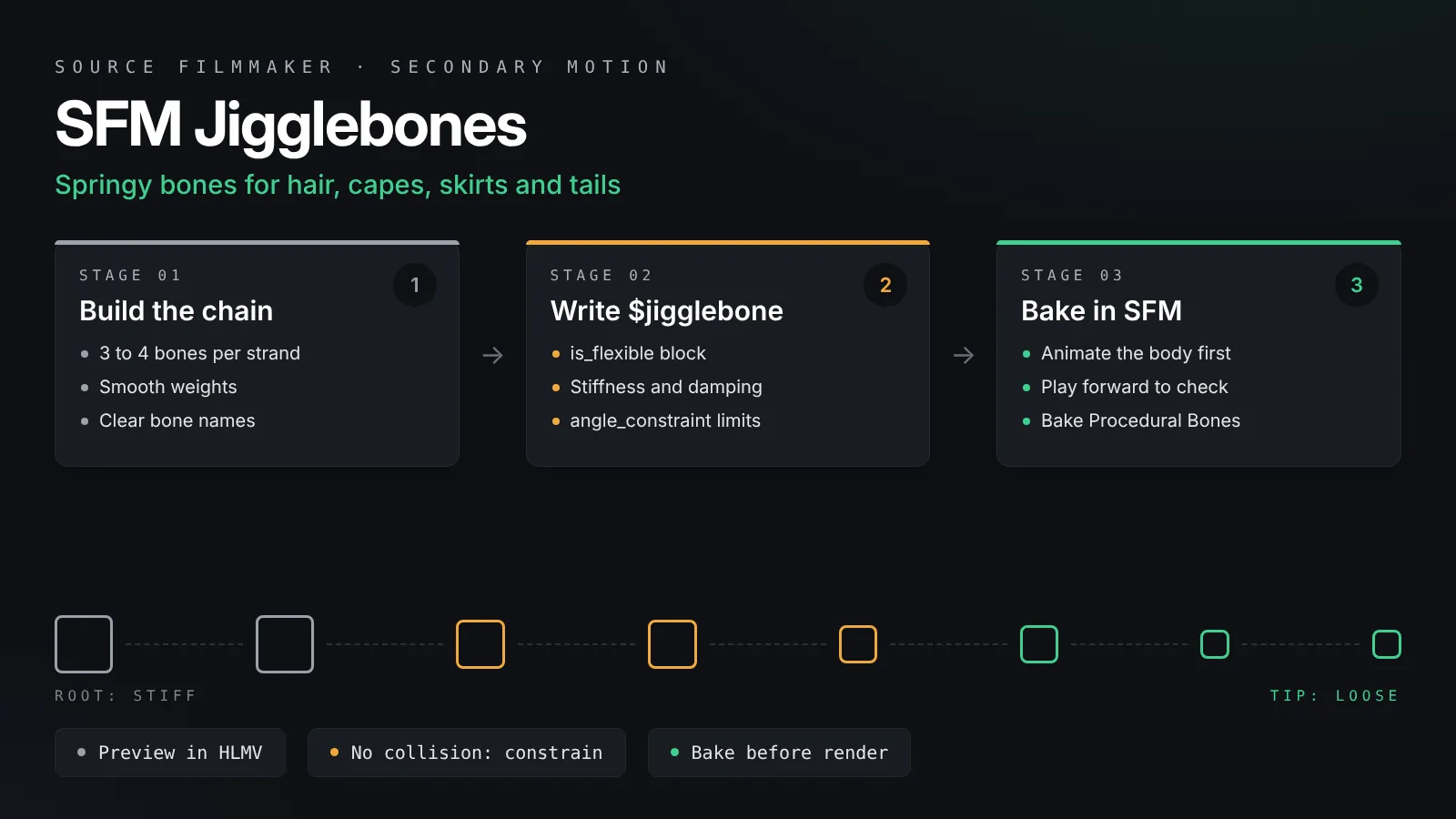
SFM jigglebones are springy bones defined with a $jigglebone block in the model's QC file. They lag behind their parent bone, overshoot and settle, which gives hair and cloth natural secondary motion. Build bone chains, tune length, stiffness and damping, add angle constraints, then use Bake Procedural Bones before you render.
Hair that bounces as a character turns and a cape that trails behind a run make an SFM shot feel alive. You could animate every strand by hand, but jigglebones do most of that work for you. SFM jigglebones are springy bones defined in the model’s QC file. They react to the motion of their parent bone, swing past the rest pose and settle back. This guide explains how they work, how to write and tune a $jigglebone block for hair and cloth, and how to bake the result so your final render looks exactly like your preview.
Jigglebones are not a cloth simulator. They do not collide with the body, and they only move bones. Used well, though, they give convincing secondary motion for a fraction of the effort.
The short version:
Give the hair, cape or skirt a chain of bones in Blender and weight the mesh to them.
Add a $jigglebone block with is_flexible for each bone that should swing, then set length, stiffness and damping.
Limit the swing with angle_constraint or pitch and yaw constraints so parts do not pass through the body.
Compile, preview in HLMV, then use Bake Procedural Bones in SFM before you render.
How Jigglebones Work in Source
A jigglebone is a normal bone that the engine moves for you.
A spring on the end of a bone
Picture each jigglebone as a small weight on a spring. When the parent bone moves, the weight lags behind, overshoots and then settles. Stiffness sets how hard the spring pulls the bone back to its rest pose. Damping sets how quickly the bouncing dies away. Every frame, Source works out where the tip of the bone should be and rotates the bone to point there.
Procedural, not keyframed
Jiggle motion is calculated live, frame by frame, from the motion that came before it. That is why it looks natural. It is also why it can go wrong when you scrub the timeline backwards or jump around, since the spring starts from wherever it was last. Our SFM physics guide explains this in more depth alongside ragdolls and Blender simulations.
Settings live inside the model
The $jigglebone values are compiled into the MDL file. You cannot change stiffness or damping from a slider inside SFM. To tune them, you edit the QC and compile again. This makes HLMV your best friend while tuning, because it previews the jiggle without loading SFM.
Setting Up Bones for Hair and Cloth
Good jiggle starts with a good bone chain.
Build chains, not single bones
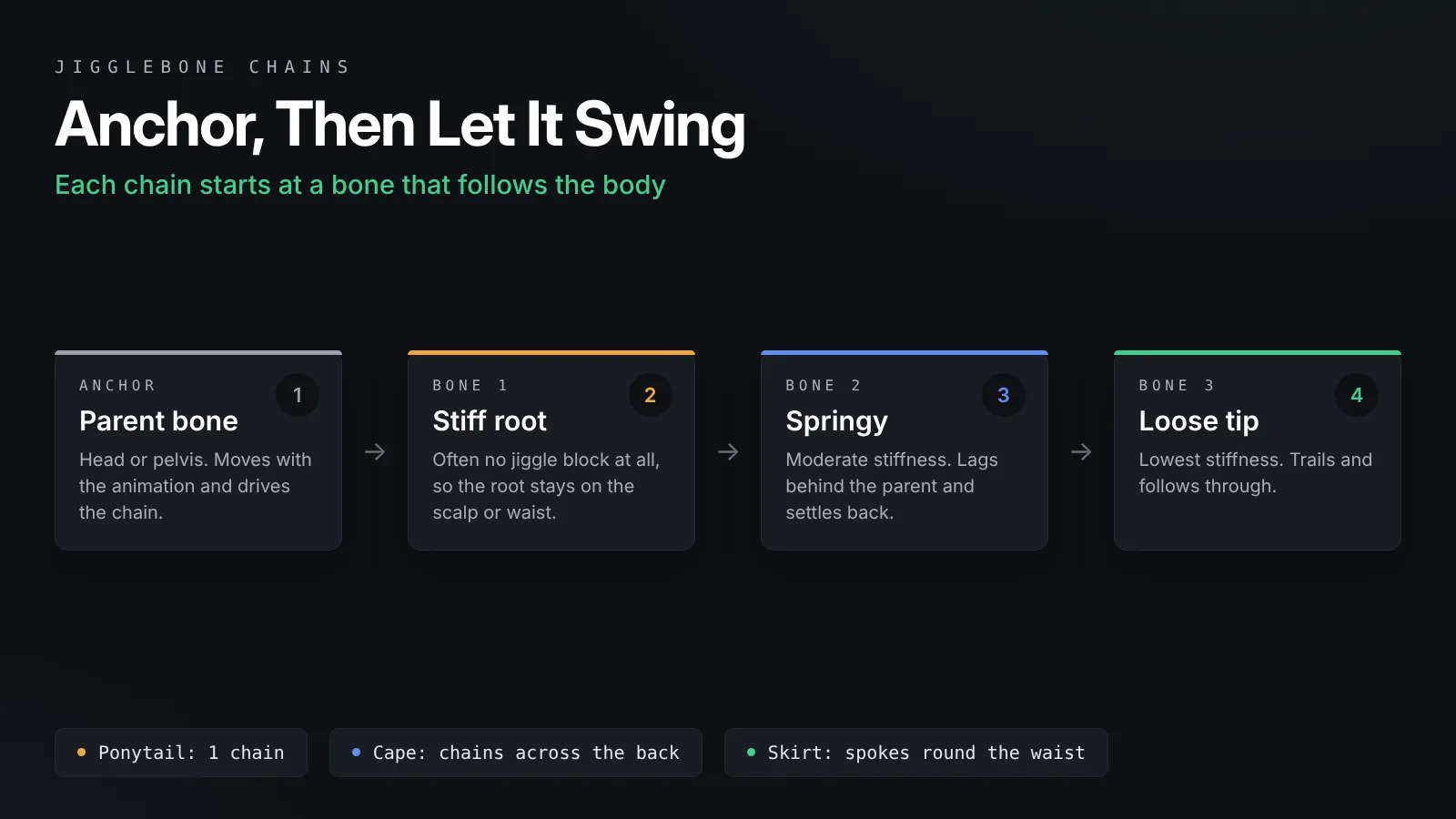
A ponytail with one bone swings like a stiff stick. A chain of three or four bones bends and follows through like real hair. For a cape, use several chains side by side across the back. For a skirt, place chains around the waist like spokes on a wheel. Each chain should start at a bone that follows the body, such as the head or the pelvis.
Weight the mesh smoothly
Weight each vertex to the nearest bones in the chain, and blend between them. Hard weights where a vertex belongs to only one bone give sharp creases when the chain bends. The first bone of each chain should share weights with its parent, so the root of the hair does not tear away from the scalp.
Name bones clearly
Use names such as hair_01, hair_02 and hair_03, or cape_L_01 and cape_R_01. The QC refers to bones by name, and clear names make long $jigglebone lists much easier to read. Our Blender to SFM porting guide covers armature export and bone naming rules.
Writing the $jigglebone Block
Each jigglebone gets its own block in the QC file.
A flexible bone
This is a good starting point for a strand of hair:
$jigglebone "hair_02"
{
	is_flexible
	{
		length 12
		tip_mass 0
		pitch_stiffness 60
		pitch_damping 6
		yaw_stiffness 60
		yaw_damping 6
		along_stiffness 100
		along_damping 0
		angle_constraint 40
	}
}
The block names the bone, then is_flexible turns on bending in two directions. Pitch is the up and down swing, and yaw is the side to side swing. Set length to roughly the distance from this bone to the tip of the part it moves, in Source units.
A rigid bone
The is_rigid option makes a stiffer, simpler pendulum. Use it for parts that should swing as a whole without bending, such as a dangling earring or a sword in a loose sheath.
$jigglebone "earring_L"
{
	is_rigid
	{
		length 4
		tip_mass 10
	}
}
Base springs
A has_base_spring section moves the base of the bone instead of rotating it, which suits a bouncing backpack or a loose belt pouch. It takes stiffness, damping and base_mass, plus left, up and forward constraints, each with a minimum and maximum, that cap how far the base may travel. Use it sparingly, since most hair and cloth only needs is_flexible. The Valve Developer Community $jigglebone reference lists every parameter and its default.
Tuning Stiffness, Damping and Mass
The numbers decide whether hair looks silky or rubbery.
What each setting does
This table is a quick reference for the values you will change most often.
| Setting | Raise it to | Lower it to |
|---|---|---|
| pitch_stiffness and yaw_stiffness | Snap back faster and swing less | Swing wider and lag longer |
| pitch_damping and yaw_damping | Stop the bounce sooner | Let the part bounce for longer |
| tip_mass | Make the tip sag under gravity | Remove the gravity pull |
| length | Make the swing feel heavier and slower | Make small, quick wobbles |
| angle_constraint | Allow a wider swing | Keep the part close to rest |
Starting values for common parts
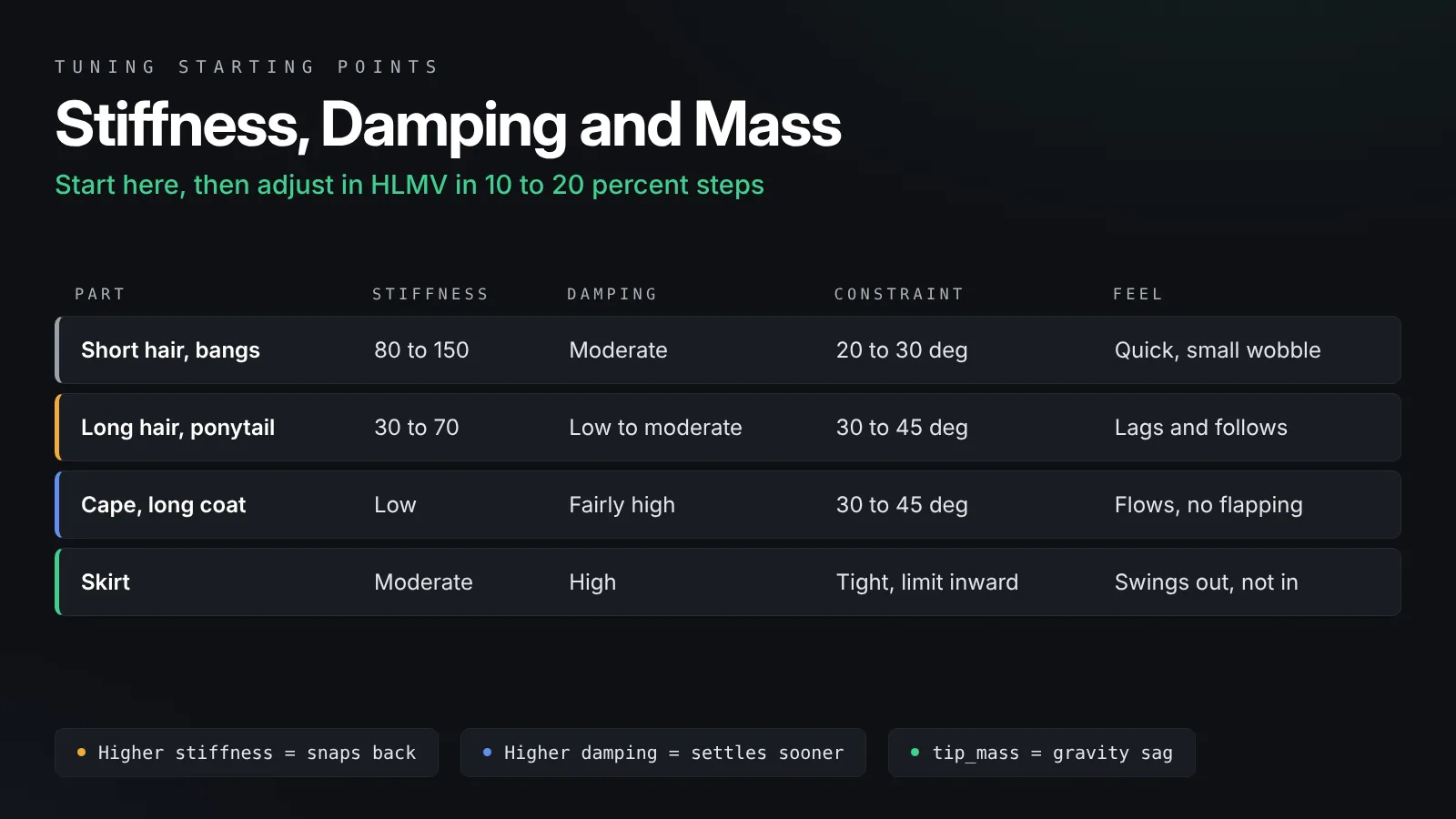
Short hair and bangs work well with high stiffness, around 80 to 150, and moderate damping. Long hair and ponytails need lower stiffness, around 30 to 70, so they lag and follow through. Capes and long coats look best with low stiffness and fairly high damping, so they flow without flapping endlessly. Skirts usually need high damping and tight constraints, because they sit close to the legs. Treat these as starting points and test them, because the right value depends on your bone lengths and the scale of the model.
Stiffer at the root, looser at the tip
For a chain, make the first bone stiffer than the last. The root then follows the head closely while the tip trails behind. Many modelers leave the very first bone without a $jigglebone block at all, so it stays locked to the head, and only make the bones below it springy.
Tip mass and gravity
With tip_mass at zero, the bone ignores gravity and only reacts to motion. Raising it makes the part hang and sag. Too much mass on a long chain makes hair droop down the back of the head, so raise it in small steps.
Stopping Clipping With Constraints
Jigglebones do not know where the body is, so you have to fence them in.
angle_constraint
The simplest limit is angle_constraint, which caps how far the bone can rotate away from its rest direction, in degrees. Values from 20 to 45 keep most hair and cloth from swinging into the head or chest.
pitch_constraint and yaw_constraint
For finer control, set a minimum and maximum angle for each axis, such as pitch_constraint -10 40. This lets a skirt swing outward but not inward into the legs. Add pitch_friction or yaw_friction if the bone rattles against its limit.
Shape the rest pose
Constraints work around the rest pose, so set that pose with care in Blender. A skirt whose bones already flare slightly outward clips much less than one whose bones hang straight down against the thighs.
Compiling and Previewing
Test the jiggle before you ever open SFM.
Compile with Crowbar
Add the $jigglebone blocks near the end of your QC, after the bodies and before any sequences, then compile with Crowbar. Our Crowbar tutorial covers decompiling an existing model and compiling it again. If the model already has bodygroups, the same QC can hold everything, as shown in our guide to SFM bodygroups and skins.
Preview in HLMV
Open the model in Half-Life Model Viewer and play an animation that moves the head or hips. The jigglebones react as the sequence plays. Watch for three things: hair that never settles, parts that sink through the body, and chains that stretch. Adjust, compile and test again. Small changes of about 10 to 20 percent are easier to judge than big jumps.
Using Jigglebones in an SFM Shot
Once the model behaves in HLMV, it is ready for animation.
Animate the body first
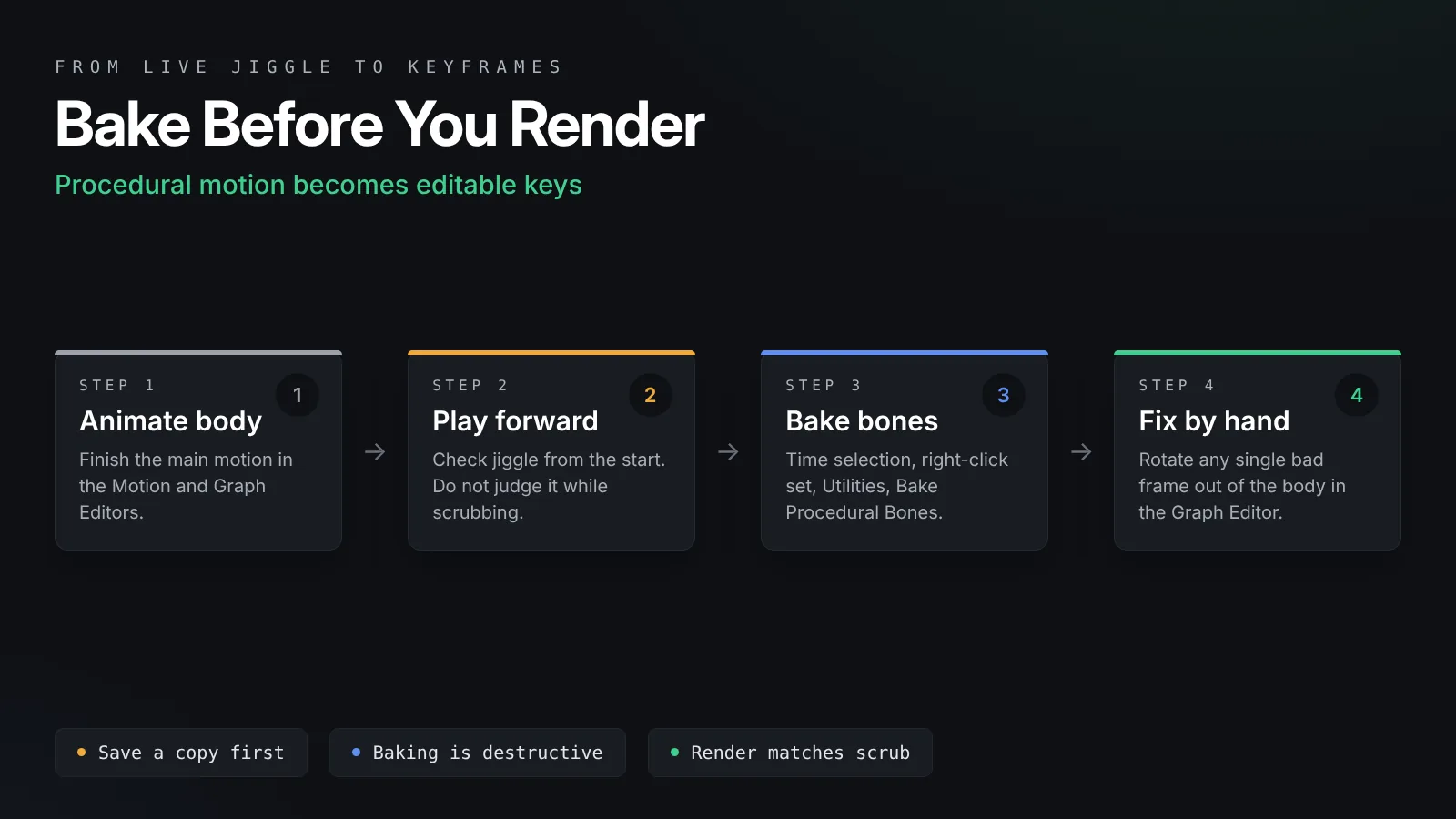
Jigglebones react to the bones above them. Finish the main body animation in the Motion Editor and Graph Editor before you judge the hair. Our Motion Editor and Graph Editor guide covers that part of the workflow.
Play forward, do not scrub
While you work, play the shot from the start to see the true jiggle. Scrubbing backwards or jumping the playhead makes the spring restart from an odd position, which looks like a glitch even though the model is fine.
Bake Procedural Bones before rendering
Set a time selection over the whole shot, right-click the animation set in the Animation Set Editor, open Utilities and choose Bake Procedural Bones. SFM steps through every frame and writes the jiggle as keyframes. After that, the motion is fixed, you can scrub freely, and you can smooth or exaggerate it in the Graph Editor. Save a copy of the session first, because baking replaces the live behavior.
Fix a bad frame by hand
Once baked, a strand that pokes through a shoulder is just a keyframe problem. Select that bone, find the frame and rotate it out of the body. This is often faster than going back to the QC for one moment in one shot.
Troubleshooting Common Jigglebone Problems
Most jiggle issues fall into a few patterns.
| Problem | Likely cause | Fix |
|---|---|---|
| Hair jitters or vibrates | Stiffness high with very low damping | Raise damping or lower stiffness |
| Cape swings forever | Damping too low | Raise damping in steps of 2 to 5 |
| Hair sinks into the head | Too much tip_mass or no constraint | Lower tip_mass and add angle_constraint |
| Skirt passes through legs | Rest pose too close to the body | Flare the rest pose and limit pitch inward |
| Render does not match preview | Live jiggle evaluated differently | Bake Procedural Bones before rendering |
| Nothing moves at all | Bone name in the QC does not match | Copy the exact bone name from the armature |
Frequently Asked Questions
Can I add jigglebones to a model without recompiling it?
No. Jigglebone settings are stored in the compiled model. You need to decompile it with Crowbar, add $jigglebone blocks to the QC and compile it again. You can still animate hair by hand on a model with no jigglebones.
Do SFM jigglebones collide with the body?
No. Jigglebones have no collision. Use angle_constraint or pitch and yaw constraints to keep them away from the body, set a good rest pose, and fix any leftover clipping by hand after baking.
Why does my hair look different in the render than in the viewport?
Jiggle is calculated live, so it can change with playback order and render sampling. Run Bake Procedural Bones over the shot before rendering, and the render will match what you see when you scrub.
What is the difference between is_flexible and is_rigid?
is_flexible lets the bone bend on two axes with separate stiffness and damping, which suits hair and cloth. is_rigid treats the bone as a stiff pendulum with a length and a tip mass, which suits small solid parts such as earrings.
How many jigglebones can one model have?
A model can have many, and characters with long hair or layered clothing often use dozens. Each one adds a little work per frame, so use them where motion shows on camera and leave hidden parts static.
Can jigglebones make realistic cloth like Blender?
Not on their own. They give convincing secondary motion for hair, capes and skirts, but they cannot fold or drape like a true cloth sim. For complex cloth, simulate it in Blender, bake it to bones and import the animation into SFM.
Final Thoughts
Small numbers, many tests
SFM jigglebones reward patience more than complex settings. Build a clean bone chain, start with is_flexible and modest values, keep the root stiff and the tip loose, and fence everything in with constraints. Preview in HLMV, animate the body first, and bake before you render. With that routine, hair and cloth will move on their own and your shots will feel finished.